When an ASP.NET Core application uses SQL Server, ASP.NET Core Identity tables are commonly created under the
dbo schema.
For a small application, keeping everything under dbo may be perfectly fine. However, in a larger application where the same database contains
Identity, Orders, Products, Customers, Payments, and other business tables, separating Identity tables into their own database schema can make the database easier to understand and manage.
For example:
dbo.Products
dbo.Orders
dbo.OrderItems
dbo.Customers

identity.AspNetUsers
identity.AspNetRoles
identity.AspNetUserRoles
identity.AspNetUserClaims
identity.AspNetUserLogins
identity.AspNetUserTokens
identity.AspNetRoleClaims
The good news is that yes, you can change the ASP.NET Core Identity schema from
dbo to identity.
EF Core supports mapping entities to a specific schema with ToTable() and supports configuring a default schema with
HasDefaultSchema(). Microsoft also documents changing the Identity model and mapping Identity tables to a different schema.
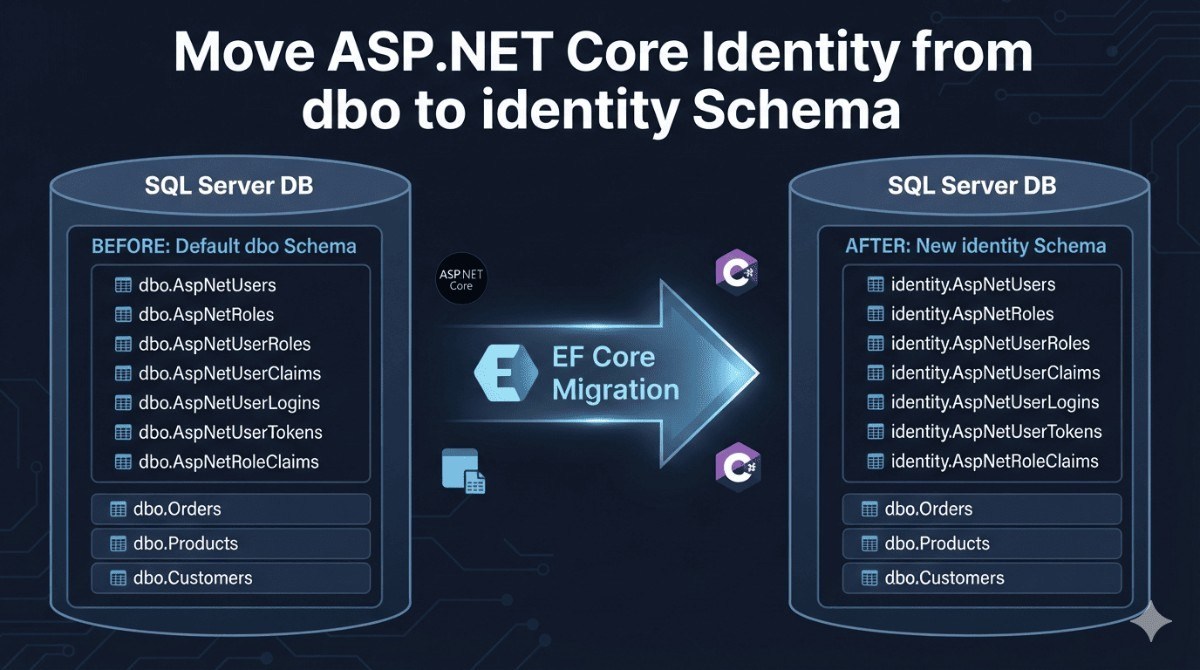
Why Separate Identity Tables into Their Own Schema?
A database schema is a useful organizational boundary.
Suppose your application currently has:
dbo.AspNetUsers
dbo.AspNetRoles
dbo.AspNetUserRoles
dbo.Products
dbo.Orders
dbo.OrderItems
dbo.Payments
dbo.Customers
As the application grows, it can become difficult to distinguish framework tables from application tables.
A cleaner structure could be:
identity.AspNetUsers
identity.AspNetRoles
identity.AspNetUserRoles
identity.AspNetUserClaims
identity.AspNetUserLogins
identity.AspNetUserTokens
identity.AspNetRoleClaims

dbo.Products
dbo.Orders
dbo.OrderItems
dbo.Payments
dbo.Customers
This doesn't create a separate database. Both schemas still exist inside the same SQL Server database.
The result is simply better logical separation.
How ASP.NET Core Identity Tables Are Configured
ASP.NET Core Identity normally uses an IdentityDbContext derived context. Identity's model is configured through
OnModelCreating(), where you can customize table names, columns, and schemas.
Microsoft recommends calling base.OnModelCreating() first and then applying your own configuration because EF Core's configuration follows a last-configuration-wins pattern in these scenarios.
For example:
protected override void OnModelCreating(ModelBuilder builder)
{
    base.OnModelCreating(builder);

    builder.HasDefaultSchema("identity");
}
This is the simplest approach if you want the whole EF Core model to use
identity as its default schema.
However, there is an important consideration.
If your same DbContext also contains:
Products
Orders
OrderItems
Customers
you probably don't want those tables moved from dbo to
identity.
Instead, explicitly map Identity tables to identity and your application tables to
dbo.
Recommended Configuration for a Mixed Database
For an application containing both Identity and business entities, explicit schema mapping is usually clearer.
For example:
protected override void OnModelCreating(ModelBuilder builder)
{
    base.OnModelCreating(builder);

    builder.Entity<ApplicationUser>()
        .ToTable("AspNetUsers", "identity");

    builder.Entity<IdentityRole>()
        .ToTable("AspNetRoles", "identity");

    builder.Entity<IdentityUserClaim<string>>()
        .ToTable("AspNetUserClaims", "identity");

    builder.Entity<IdentityUserLogin<string>>()
        .ToTable("AspNetUserLogins", "identity");

    builder.Entity<IdentityUserRole<string>>()
        .ToTable("AspNetUserRoles", "identity");

    builder.Entity<IdentityUserToken<string>>()
        .ToTable("AspNetUserTokens", "identity");

    builder.Entity<IdentityRoleClaim<string>>()
        .ToTable("AspNetRoleClaims", "identity");
}
Your business entities can remain in dbo:
builder.Entity<Product>()
    .ToTable("Products", "dbo");

builder.Entity<Order>()
    .ToTable("Orders", "dbo");

builder.Entity<OrderItem>()
    .ToTable("OrderItems", "dbo");
EF Core supports this type of per-entity schema configuration through ToTable().
What If You Are Starting a New Database?
If you're starting a new application/database, the process is relatively straightforward.
Configure the Identity entities before creating your migrations:
protected override void OnModelCreating(ModelBuilder builder)
{
    base.OnModelCreating(builder);

    builder.Entity<ApplicationUser>()
        .ToTable("AspNetUsers", "identity");

    builder.Entity<IdentityRole>()
        .ToTable("AspNetRoles", "identity");

    builder.Entity<IdentityUserClaim<string>>()
        .ToTable("AspNetUserClaims", "identity");

    builder.Entity<IdentityUserLogin<string>>()
        .ToTable("AspNetUserLogins", "identity");

    builder.Entity<IdentityUserRole<string>>()
        .ToTable("AspNetUserRoles", "identity");

    builder.Entity<IdentityUserToken<string>>()
        .ToTable("AspNetUserTokens", "identity");

    builder.Entity<IdentityRoleClaim<string>>()
        .ToTable("AspNetRoleClaims", "identity");
}
Then create your migration:
dotnet ef migrations add InitialCreateand apply it:
dotnet ef database updateEF Core migrations are designed to incrementally synchronize the application's model with the database schema.
The resulting database can look like:
identity
    AspNetUsers
    AspNetRoles
    AspNetUserRoles
    AspNetUserClaims
    AspNetUserLogins
    AspNetUserTokens
    AspNetRoleClaims

dbo
    Products
    Orders
    OrderItems
    Customers
    Payments
What If the Database Already Exists?
This is where you need to be more careful.
Suppose your production database currently contains:
dbo.AspNetUsers
dbo.AspNetRoles
dbo.AspNetUserRoles
dbo.AspNetUserClaims
dbo.AspNetUserLogins
dbo.AspNetUserTokens
dbo.AspNetRoleClaims
and you change your EF Core configuration to:
.ToTable("AspNetUsers", "identity")EF Core will now expect:
identity.AspNetUsersBut the existing database still contains:
dbo.AspNetUsersChanging the C# configuration does not physically move the existing SQL Server table.
You therefore need a database migration.
Moving Existing Tables to the identity Schema
First create the schema:
CREATE SCHEMA identity;
GO
Then move the Identity tables:
ALTER SCHEMA identity TRANSFER dbo.AspNetUsers;
ALTER SCHEMA identity TRANSFER dbo.AspNetRoles;
ALTER SCHEMA identity TRANSFER dbo.AspNetUserClaims;
ALTER SCHEMA identity TRANSFER dbo.AspNetUserLogins;
ALTER SCHEMA identity TRANSFER dbo.AspNetUserRoles;
ALTER SCHEMA identity TRANSFER dbo.AspNetUserTokens;
ALTER SCHEMA identity TRANSFER dbo.AspNetRoleClaims;
GO
This moves the tables from:
dbo.AspNetUsersto:
identity.AspNetUserswithout creating a second copy of the table's data.
Your business tables remain untouched:
dbo.Products
dbo.Orders
dbo.OrderItems
Should You Put This SQL Directly in an EF Core Migration?
For an existing database, this is often a good approach.
You can create a migration:
dotnet ef migrations add MoveIdentityTablesToIdentitySchemaThen review the generated migration carefully and customize it if necessary.
For example:
protected override void Up(MigrationBuilder migrationBuilder)
{
    migrationBuilder.Sql("""
        IF NOT EXISTS (
            SELECT 1
            FROM sys.schemas
            WHERE name = 'identity'
        )
        BEGIN
            EXEC('CREATE SCHEMA identity');
        END
        """);

    migrationBuilder.Sql("""
        ALTER SCHEMA identity TRANSFER dbo.AspNetUsers;
        ALTER SCHEMA identity TRANSFER dbo.AspNetRoles;
        ALTER SCHEMA identity TRANSFER dbo.AspNetUserClaims;
        ALTER SCHEMA identity TRANSFER dbo.AspNetUserLogins;
        ALTER SCHEMA identity TRANSFER dbo.AspNetUserRoles;
        ALTER SCHEMA identity TRANSFER dbo.AspNetUserTokens;
        ALTER SCHEMA identity TRANSFER dbo.AspNetRoleClaims;
        """);
}
You would also normally implement the appropriate reverse operations in
Down() if you need the migration to be reversible.
EF Core explicitly supports using raw SQL inside migrations for database operations that aren't directly represented by standard migration operations. Microsoft also recommends reviewing generated migrations rather than blindly applying them.
Don't Forget Foreign Keys
This is one of the most important considerations when moving existing Identity tables.
Your application may have relationships such as:
Orders.UserId
        ↓
dbo.AspNetUsers.Id
After moving the user table, the relationship becomes:
Orders.UserId
        ↓
identity.AspNetUsers.Id
SQL Server can maintain foreign-key relationships when a table is transferred between schemas, but you should verify the resulting constraints and any database objects that explicitly reference the old two-part name.
For example, stored procedures, views, functions, raw SQL queries, reports, and scripts might contain:
SELECT *
FROM dbo.AspNetUsers
After the migration, that needs to become:
SELECT *
FROM identity.AspNetUsers
This is particularly important in applications that use raw SQL in addition to EF Core.
What About __EFMigrationsHistory?
There is another table worth understanding:
dbo.__EFMigrationsHistory
This is not an ASP.NET Core Identity table.
It is EF Core's migrations history table.
By default, EF Core uses __EFMigrationsHistory to record which migrations have been applied.
You don't need to move this table simply because you moved Identity tables.
If you want it in another schema, EF Core supports configuring its schema separately using
MigrationsHistoryTable().
For example:
options.UseSqlServer(
    connectionString,
    sql => sql.MigrationsHistoryTable(
        "__EFMigrationsHistory",
        "dbo"));
Keeping it in dbo while putting Identity in identity is perfectly reasonable.
HasDefaultSchema() vs ToTable()
There are two common approaches.
Option 1: HasDefaultSchema()
builder.HasDefaultSchema("identity");This changes the default schema for entities that don't explicitly specify one.
Microsoft notes that setting a model-level default schema also affects other database objects such as sequences.
This can be convenient when everything in the DbContext belongs to Identity.
Option 2: ToTable()
builder.Entity<ApplicationUser>()
    .ToTable("AspNetUsers", "identity");
This is more explicit.
For a database containing both Identity and business entities, I generally prefer explicit mapping:
Identity → identity schema
Business entities → dbo schema
It makes the database structure immediately understandable to developers and DBAs.
Example Database Architecture
For a typical e-commerce application, you might end up with:
Database: MyShop

identity
├── AspNetUsers
├── AspNetRoles
├── AspNetUserRoles
├── AspNetUserClaims
├── AspNetUserLogins
├── AspNetUserTokens
└── AspNetRoleClaims

dbo
├── Products
├── Categories
├── Orders
├── OrderItems
├── Customers
├── Payments
├── Addresses
└── Inventory

dbo
└── __EFMigrationsHistory
This is a perfectly valid SQL Server design.
The database remains one database, but the schemas provide a logical separation between authentication/authorization infrastructure and business data.
Is There Any Performance Benefit?
Usually, you should not move Identity tables to another schema expecting a major performance improvement.
Changing:
dbo.AspNetUsersto:
identity.AspNetUsersis primarily an organization, security, and database-management decision, not a performance optimization.
Query performance is generally driven much more by things such as:
- indexes
- query shape
- execution plans
- table size
- statistics
appropriate database design
The schema name itself isn't normally going to make an Identity query substantially faster.
Is It Safe to Do This in Production?
Yes, but treat it as a database migration, not merely a code change.
Before applying the change to production:
- Back up the database.
- Test the migration against a copy of the production database.
- Verify all Identity tables.
- Verify foreign keys.
- Check views and stored procedures.
- Search the application for hard-coded
dbo.AspNet...references. - Review the generated migration SQL.
- Test login, registration, roles, claims, password reset, and external login scenarios.
- Deploy the migration.
- Verify the application after deployment.
Microsoft recommends inspecting and testing migrations before applying them to production, particularly because schema changes can have destructive consequences if the generated migration doesn't represent the intended change.
For production environments, generating a SQL migration script can also be useful because the script can be reviewed or modified before a DBA applies it.
Final Recommendation
If your database contains both ASP.NET Core Identity tables and application-specific tables such as:
Products
Orders
OrderItems
Customers
Payments
then separating Identity into an identity schema is a reasonable and clean architecture:
identity.AspNetUsers
identity.AspNetRoles
identity.AspNetUserRoles
identity.AspNetUserClaims
identity.AspNetUserLogins
identity.AspNetUserTokens
identity.AspNetRoleClaims

dbo.Products
dbo.Orders
dbo.OrderItems
dbo.Customers
dbo.Payments
For a new database, configure the Identity mappings before creating the initial migration.
For an existing database, don't just change OnModelCreating(). Create a controlled migration that moves the existing tables from
dbo to identity, verify dependencies, and test it before production deployment.
The key idea is:
ASP.NET Core Identity does not require its tables to live in the
dboschema. EF Core allows Identity's tables to be mapped to a different SQL Server schema.
