CQRS stands for Command Query Responsibility Segregation.
The name sounds complicated, but the basic idea is actually simple:
Commands change data. Queries read data.
Instead of using one service or method to handle both reading and writing, CQRS separates these two responsibilities.
What Problem Does CQRS Solve?
Imagine you are building an e-commerce application.
You might have a service like this:
public class ProductService
{
    public Product GetProduct(int id)
    {
        // Read product information from the database
        return _repository.GetById(id);
    }

    public void UpdateProduct(Product product)
    {
        // Update product information in the database
        _repository.Update(product);
    }
}
There is nothing wrong with this approach for a small application.
But as the application grows, the same service may start handling many different responsibilities:
- Creating products
- Updating products
- Deleting products
- Searching products
- Getting product details
- Generating reports
- Validating business rules
The service can become large and difficult to maintain.
CQRS suggests separating write operations from read operations.
What Is CQRS?
CQRS divides application operations into two categories:
1. Command
A Command represents an operation that changes the application's state.
Examples:
CreateProduct
UpdateProduct
DeleteProduct
PlaceOrder
CancelOrder
RegisterCustomer
A command usually contains the information required to perform an operation.
For example:
public class CreateProductCommand
{
    // Name of the product we want to create
    public string Name { get; set; }

    // Price of the product
    public decimal Price { get; set; }
}
The command itself doesn't necessarily perform the operation.
It is simply a message saying:
"Please create this product."
2. Query
A Query is used to retrieve data.
Examples:
GetProductById
GetAllProducts
SearchProducts
GetCustomerOrders
GetOrderDetails
A query should generally not change application state.
For example:
public class GetProductQuery
{
    // ID of the product we want to retrieve
    public int ProductId { get; set; }
}
The query says:
"Please give me the product with this ID."
Simple Way to Remember CQRS
Think about a restaurant.
You have two different activities:
Ordering food
Customer
   |
   v
"Give me a Pizza"
   |
   v
Kitchen
This changes the state of the restaurant because an order has been created.
That's similar to a Command.
Now imagine asking:
Customer
   |
   v
"What is my order status?"
   |
   v
System
You are only reading information.
That's similar to a Query.
So remember:
COMMAND = CHANGE

QUERY = READ
CQRS Architecture
A simple CQRS architecture can look like this:
                Client
                  |
                  v
          ASP.NET Core API
                  |
          +-------+-------+
          |               |
          v               v
      Commands         Queries
          |               |
          v               v
   Command Handler   Query Handler
          |               |
          v               v
       Database         Database
The important part is that the application has separate paths for reading and writing.
CQRS Without MediatR
You don't need a library to understand or implement CQRS.
Let's create a simple example without MediatR first.
Suppose we have a product API.
Our model:
public class Product
{
    // Unique identifier of the product
    public int Id { get; set; }

    // Product name
    public string Name { get; set; }

    // Product price
    public decimal Price { get; set; }
}
Now let's create a command.
CreateProductCommand
public class CreateProductCommand
{
    // Name provided by the client
    public string Name { get; set; }

    // Price provided by the client
    public decimal Price { get; set; }
}
Then we create a command handler.
CreateProductCommandHandler
public class CreateProductCommandHandler
{
    private readonly AppDbContext _dbContext;

    public CreateProductCommandHandler(AppDbContext dbContext)
    {
        // Store the database context for later use
        _dbContext = dbContext;
    }

    public async Task Handle(CreateProductCommand command)
    {
        // Convert the command into a Product entity
        var product = new Product
        {
            Name = command.Name,
            Price = command.Price
        };

        // Add the product to the database
        _dbContext.Products.Add(product);

        // Save the changes
        await _dbContext.SaveChangesAsync();

        // Return the newly generated product ID
        return product.Id;
    }
}
The responsibility is clear:
CreateProductCommand
        |
        v
CreateProductCommandHandler
        |
        v
Create Product
        |
        v
Database
Creating a Query
Now let's retrieve a product.
First, create the query:
public class GetProductQuery
{
    // ID of the product we want to retrieve
    public int ProductId { get; set; }
}
Then create the query handler:
public class GetProductQueryHandler
{
    private readonly AppDbContext _dbContext;

    public GetProductQueryHandler(AppDbContext dbContext)
    {
        // Store the database context
        _dbContext = dbContext;
    }

    public async Task Handle(GetProductQuery query)
    {
        // Find the product using the ID from the query
        return await _dbContext.Products
            .FirstOrDefaultAsync(x => x.Id == query.ProductId);
    }
}
Notice something important.
The query handler only retrieves data.
It doesn't update the product.
Using CQRS in a Controller
Now we can use our handlers from an ASP.NET Core controller.
[ApiController]
[Route("api/products")]
public class ProductsController : ControllerBase
{
    private readonly CreateProductCommandHandler _createHandler;
    private readonly GetProductQueryHandler _queryHandler;

    public ProductsController(
        CreateProductCommandHandler createHandler,
        GetProductQueryHandler queryHandler)
    {
        // Inject the command handler
        _createHandler = createHandler;

        // Inject the query handler
        _queryHandler = queryHandler;
    }

    [HttpPost]
    public async Task Create(CreateProductCommand command)
    {
        // Execute the command to create a product
        var productId = await _createHandler.Handle(command);

        // Return the newly created product ID
        return Ok(productId);
    }

    [HttpGet("{id}")]
    public async Task Get(int id)
    {
        // Create a query containing the requested product ID
        var query = new GetProductQuery
        {
            ProductId = id
        };

        // Execute the query
        var product = await _queryHandler.Handle(query);

        // Return 404 when the product doesn't exist
        if (product == null)
        {
            return NotFound();
        }

        // Return the product to the client
        return Ok(product);
    }
}
Now our API has a clear separation:
POST /api/products
        |
        v
CreateProductCommand
        |
        v
CreateProductCommandHandler
        |
        v
Database


GET /api/products/10
        |
        v
GetProductQuery
        |
        v
GetProductQueryHandler
        |
        v
Database
CQRS With MediatR
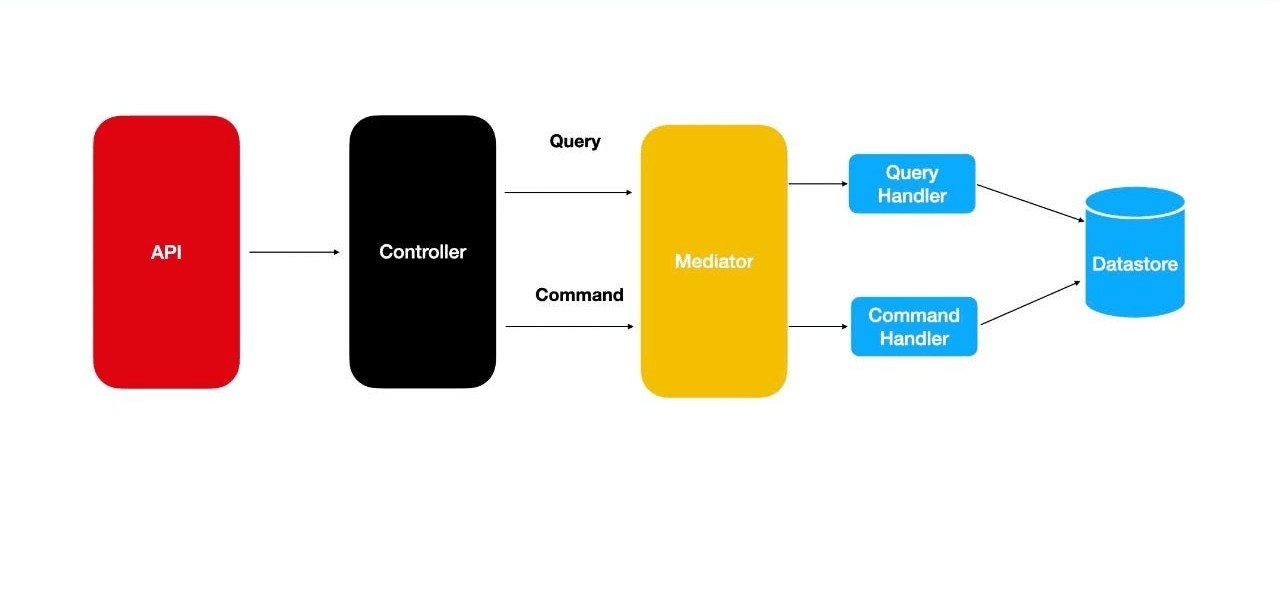
In real-world .NET applications, you will often see CQRS implemented using a mediator library such as MediatR.
The mediator provides a central mechanism for sending commands and queries to their handlers.
The architecture becomes:
Controller
    |
    v
Mediator
    |
    +----> Command Handler
    |
    +----> Query Handler
The controller doesn't need to know which handler will process the request.
Installing MediatR
You can install MediatR using the .NET CLI:
dotnet add package MediatRThen configure it in your application.
For modern ASP.NET Core applications, the exact registration syntax can vary by MediatR version, so check the version's documentation when setting up a new project.
Creating a Command With MediatR
Our command can implement IRequest.
using MediatR;

public class CreateProductCommand : IRequest
{
    // Name of the product
    public string Name { get; set; }

    // Price of the product
    public decimal Price { get; set; }
}
IRequest means:
This request will eventually return an integer.
In our example, that integer will be the new product's ID.
Creating the Command Handler
using MediatR;

public class CreateProductCommandHandler
    : IRequestHandler
{
    private readonly AppDbContext _dbContext;

    public CreateProductCommandHandler(AppDbContext dbContext)
    {
        // Store the database context
        _dbContext = dbContext;
    }

    public async Task Handle(
        CreateProductCommand command,
        CancellationToken cancellationToken)
    {
        // Create a new Product entity from the command
        var product = new Product
        {
            Name = command.Name,
            Price = command.Price
        };

        // Add the product to the database context
        _dbContext.Products.Add(product);

        // Persist the product in the database
        await _dbContext.SaveChangesAsync(cancellationToken);

        // Return the generated product ID
        return product.Id;
    }
}
Now the mediator knows that:
CreateProductCommand
        |
        v
CreateProductCommandHandler
Creating a Query With MediatR
We can create a query in a similar way.
using MediatR;

public class GetProductQuery : IRequest
{
    // ID of the product we want to retrieve
    public int ProductId { get; set; }
}
Then create the query handler:
using MediatR;
using Microsoft.EntityFrameworkCore;

public class GetProductQueryHandler
    : IRequestHandler
{
    private readonly AppDbContext _dbContext;

    public GetProductQueryHandler(AppDbContext dbContext)
    {
        // Store the database context
        _dbContext = dbContext;
    }

    public async Task Handle(
        GetProductQuery query,
        CancellationToken cancellationToken)
    {
        // Query the database for the requested product
        return await _dbContext.Products
            .AsNoTracking()
            .FirstOrDefaultAsync(
                x => x.Id == query.ProductId,
                cancellationToken);
    }
}
Notice the use of:
AsNoTracking()For read-only queries, this can be useful because Entity Framework Core doesn't need to track changes to the returned entity.
Using MediatR in the Controller
Our controller becomes simpler.
using MediatR;

[ApiController]
[Route("api/products")]
public class ProductsController : ControllerBase
{
    private readonly IMediator _mediator;

    public ProductsController(IMediator mediator)
    {
        // Store the mediator instance
        _mediator = mediator;
    }

    [HttpPost]
    public async Task Create(
        CreateProductCommand command)
    {
        // Send the command to the appropriate handler
        var productId = await _mediator.Send(command);

        // Return the newly created product ID
        return Ok(productId);
    }

    [HttpGet("{id}")]
    public async Task Get(int id)
    {
        // Create a query containing the product ID
        var query = new GetProductQuery
        {
            ProductId = id
        };

        // Send the query to the appropriate handler
        var product = await _mediator.Send(query);

        // Return 404 if the product doesn't exist
        if (product == null)
        {
            return NotFound();
        }

        // Return the product
        return Ok(product);
    }
}
Now the controller doesn't directly communicate with command/query handlers.
It communicates with the mediator.
Typical CQRS Project Structure
A common project structure might look like this:
MyApplication
│
├── Controllers
│   └── ProductsController.cs
│
├── Features
│   └── Products
│       │
│       ├── Commands
│       │   └── CreateProduct
│       │       ├── CreateProductCommand.cs
│       │       └── CreateProductCommandHandler.cs
│       │
│       └── Queries
│           └── GetProduct
│               ├── GetProductQuery.cs
│               └── GetProductQueryHandler.cs
│
├── Domain
│   └── Product.cs
│
├── Infrastructure
│   └── AppDbContext.cs
│
└── Program.cs
This structure makes it easier to locate functionality.
If you want to understand how a product is created, you can go directly to:
Features
   |
   +-- Products
         |
         +-- Commands
               |
               +-- CreateProduct
CQRS Does NOT Require Two Databases
This is an important point for beginners.
Many people think CQRS means:
Command Database
       +
Query Database
That's not necessarily true.
You can implement CQRS using a single database:
Commands ──────┐
               |
               v
          SQL Database
               ^
               |
Queries ───────┘
This is often a good starting point.
More advanced systems can use separate read and write databases:
                 Application
                /            \
               /              \
        Commands              Queries
           |                     |
           v                     v
    Write Database          Read Database
           |                     ^
           |                     |
           +---- Events ---------+
This is sometimes called CQRS with separate read and write models.
CQRS and Event Sourcing Are Different
Another common beginner misconception is:
CQRS = Event Sourcing
They are related concepts, but they are not the same thing.
CQRS means:
Separate READ responsibilities
from
WRITE responsibilities
Event Sourcing means:
Store changes as a sequence of events
rather than only storing the current state.
You can use:
CQRS without Event Sourcingand:
Event Sourcing without full CQRSAlthough they are frequently used together in complex systems.
Advantages of CQRS
1. Clear separation of responsibilities
- Commands modify data.
- Queries retrieve data.
- This makes the code easier to understand.
2. Easier maintenance
Instead of having one huge service:
ProductService
 ├── Create
 ├── Update
 ├── Delete
 ├── Search
 ├── GetById
 ├── Reports
 └── Statistics
you can organize functionality around individual use cases:
CreateProductCommand
UpdateProductCommand
DeleteProductCommand

GetProductQuery
SearchProductsQuery
GetProductStatisticsQuery
3. Better scalability
Read and write workloads can be very different.
For example:
10,000 READ requests
        +
100 WRITE requests- You may eventually want to scale the read side independently.
- CQRS makes that architectural direction easier.
4. Better testing
Individual handlers can be tested independently.
For example:
CreateProductCommandHandlerTests
GetProductQueryHandlerTests
UpdateProductCommandHandlerTests
Each test can focus on one use case.
5. Cleaner business logic
Complex business operations can live inside command handlers or the domain layer rather than becoming mixed into controllers.
Disadvantages of CQRS
- CQRS isn't automatically better.
- It also introduces complexity.
1. More classes
A simple CRUD operation might require:
Command
CommandHandler
Query
QueryHandler
DTO
Validator
For a small application, this may feel excessive.
2. More architecture to learn
Developers need to understand:
- Commands
- Queries
- Handlers
- Mediators
- DTOs
- Domain logic
- Dependency injection
That's more concepts than a simple service-based architecture.
3. Potential overengineering
If your application is simply:
Create Customer
Get Customer
Update Customer
Delete Customer- traditional CRUD may be perfectly adequate.
- You don't need CQRS just because it is a popular architecture.
When Should You Use CQRS?
CQRS can be a good choice when:
- Your business logic is complex.
- Read and write operations have very different requirements.
- The application is large.
- Different teams work on different parts of the system.
- You need independent scaling of read/write workloads.
- You have many business use cases.
- You want a clear use-case-oriented architecture.
For example:
Banking System
E-commerce Platform
Order Management
Inventory System
Large Enterprise Applications
Financial Applications
These systems can benefit from CQRS.
When Should You Avoid CQRS?
For a small application such as:
Simple Blog
Small Admin Panel
Basic CRUD API
Small Internal Tool
traditional CRUD may be easier and more maintainable.
A simple architecture like:
Controller
    |
    v
Service
    |
    v
Repository
    |
    v
Database
might be all you need.
CQRS vs Traditional CRUD
Here's a simple comparison:
| Traditional CRUD | CQRS |
|---|---|
| Read/write logic often shares services | Reads and writes are separated |
| Simple to implement | More structured |
| Less code | More classes/code |
| Great for simple applications | Useful for complex applications |
| Usually one model | Can use separate read/write models |
| Easier for beginners | Better for complex business workflows |
The Most Important Concept
Don't get distracted by libraries such as MediatR.
MediatR is just a tool.
The core CQRS idea is:
              CQRS
                |
       +--------+--------+
       |                 |
       v                 v
   COMMAND            QUERY
       |                 |
       v                 v
    CHANGE             READ
     DATA              DATA
Once you understand this, libraries and frameworks become much easier to understand.
A Real-World Example
Imagine an online shopping application.
A customer clicks "Place Order."
That's a command:
PlaceOrderCommandThe handler performs business operations:
Validate Order
      |
      v
Check Inventory
      |
      v
Calculate Total
      |
      v
Create Order
      |
      v
Save Order
Later, the customer opens the order page.
That's a query:
GetOrderDetailsQueryThe query might return:
{
  "orderId": 1001,
  "customerName": "John",
  "total": 2500,
  "status": "Confirmed"
}
The important distinction is:
PlaceOrderCommand
       ↓
Changes system state


GetOrderDetailsQuery
       ↓
Reads system state
Final Takeaway
CQRS stands for Command Query Responsibility Segregation.
The basic rule is extremely simple:
Commands change data; Queries read data.
In a .NET application, you can implement CQRS manually or use tools such as MediatR to dispatch commands and queries to their handlers.
A typical flow looks like:
HTTP Request
     |
     v
Controller
     |
     v
Command / Query
     |
     v
Handler
     |
     v
Business Logic
     |
     v
Database
The biggest lesson for a beginner is not to introduce CQRS everywhere.
When your application becomes more complex and your read/write responsibilities need clearer separation, CQRS can provide a useful structure.
Once you understand the fundamental idea of "Commands change, Queries read," the rest of CQRS becomes much easier to learn.
