Introduction
Artificial intelligence is rapidly evolving from a simple chatbot into a powerful digital workspace. Claude has introduced several features that help users create content, manage knowledge, and automate workflows more effectively. Among the most important of these features are Artifacts, Artifacts Creations, Memory Importing, and the various Pricing Plans that unlock different levels of functionality. This guide explains how these features work and how they fit together to create a more productive AI experience.
What Are Artifacts?
Artifacts are dedicated workspaces where Claude can create and display substantial pieces of content outside the normal chat window. Instead of showing hundreds of lines of code or a lengthy report directly in the conversation, Claude opens the content in a separate panel where it can be viewed, edited, and refined.
Artifacts are commonly used for:
- Blog posts
- Research reports
- Business documents
- HTML websites
- React applications
- Python scripts
- Technical documentation
- Educational content
Artifacts make collaboration easier because users can continuously improve a project without losing track of the conversation.
Benefits of Artifacts
- Better organization
- Easier editing
- Live previews for certain projects
- Cleaner conversations
- Improved productivity
Artifacts transform Claude from a chatbot into a collaborative workspace.
Artifact Creation: Turning Ideas into Real Projects
Artifact Creation is the process of generating and building substantial content within Claude. When a user asks Claude to create something significant, such as a website, application, report, or business proposal, Claude can generate it as an Artifact.
example:
user request: Create a modern portfolio website.Claude can instantly generate the website structure, styling, and functionality inside an Artifact where it can be reviewed and improved. Similarly, users can create:
Content Projects
- Blog articles
- Marketing content
- Newsletters
- Research papers
Development Projects
- Landing pages
- Web applications
- Dashboards
- API prototypes
Business Projects
- Product requirement documents
- Business plans
- Strategic reports
- Presentations
Artifact Creation enables users to move from an idea to a working draft within minutes.
The Iterative Workflow
A major advantage of Artifact Creation is continuous improvement. Instead of generating a project once and starting over when changes are needed, users can simply ask:
- Make the design more modern.
- Add a dark mode.
- Expand the introduction.
- Improve the performance.
Claude updates the Artifact while preserving the rest of the project. This iterative workflow makes creation significantly faster and more efficient.
Memory Importing: Bringing Context into Claude
When you are working with lots of AI tools, it can be really tough to keep everything. You might be using ChatGPT, Gemini, Cursor and Claude. You have to explain things over and over again like what your project is about what you want to achieve and what you like.
The Memory Importing feature is a help with this. It lets you take conversations, project details, documents and workflows, from AI tools and bring them into Claude. This way Claude can see what you have already done and keep going from there of starting all over again with Claude.
Benefits of Memory Importing
- Personalized Responses
- Reduced Repetition
- Better Long-Term Projects
- Improved Productivity
For developers, researchers, writers, and professionals, Memory Importing creates a smoother workflow by connecting knowledge across different AI platforms.
Claude Pricing and Plans
Claude offers multiple subscription tiers designed for different types of users.
Free Plan
The Free Plan provides access to Claude with usage limits.
Best for:
- Casual users
- Students exploring AI
- Occasional content generation
- Learning the platform
Features
- Basic Claude access
- Standard chat functionality
- Limited usage allowances
Pro Plan
The Pro Plan is designed for individuals who rely on Claude regularly.
Best for:
- Developers
- Writers
- Researchers
- Content creators
- Students working on large projects
Benefits
- Higher message limits
- Priority access during busy periods
- Faster responses
- Access to advanced capabilities
For most power users, the Pro Plan offers the best balance between cost and functionality.
Max Plan
The Max Plan targets heavy users who need significantly larger usage allowances.
Best for:
- Professional creators
- Consultants
- Researchers
- Startup founders
- AI power users
Benefits
- Much higher usage limits
- Access to the most advanced Claude capabilities
- Better support for large workflows
- Increased productivity for intensive projects
Team and Enterprise Plans
Organizations can choose Team or Enterprise plans.
These plans provide:
- Shared workspaces
- Administrative controls
- Collaboration features
- Security enhancements
- Compliance tools
- Centralized management
Enterprise plans are particularly useful for companies integrating AI into daily operations.
How These Features Work Together
The true power of Claude emerges when these features are combined.
Step 1: Use Memory Importing
Claude remembers your preferences, goals, and projects.
Step 2: Create Through Artifacts
Build websites, reports, applications, or documents in a dedicated workspace.
Step 3: Save as Creations
Store and reuse valuable outputs for future projects.
Step 4: Scale with the Right Plan
Choose a pricing plan that matches your workflow requirements. Together, these capabilities create an ecosystem where Claude becomes more than a chatbot it becomes a long-term productivity partner.
How to create Portfolio using claude Artifact
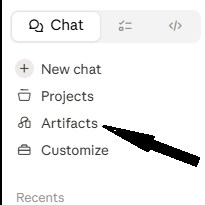
Step 1:
Open Claude, In Sidebar you may see an option named Artifacts, select the artifact option there,
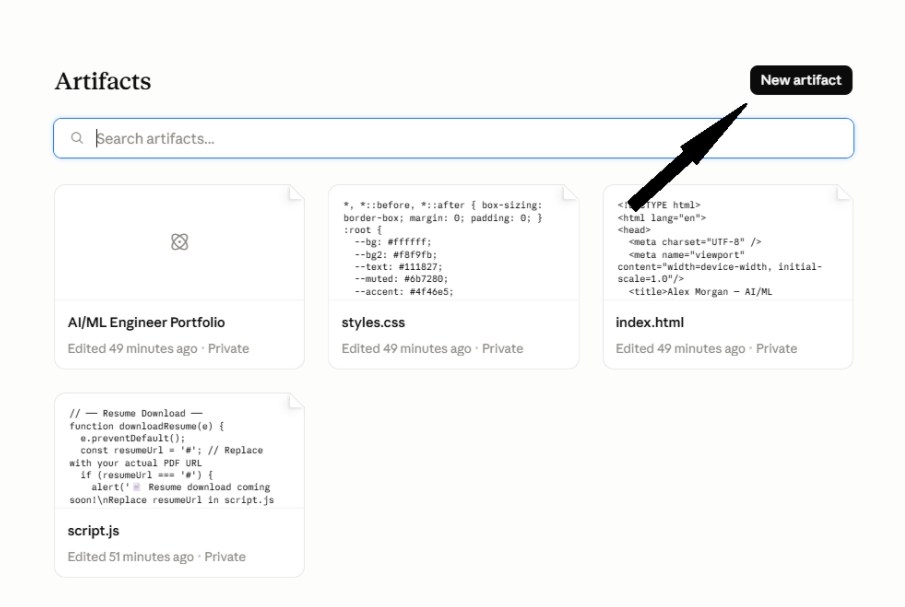
Step 2:
Now, click on the “New artifacts” button to create a new workspace.
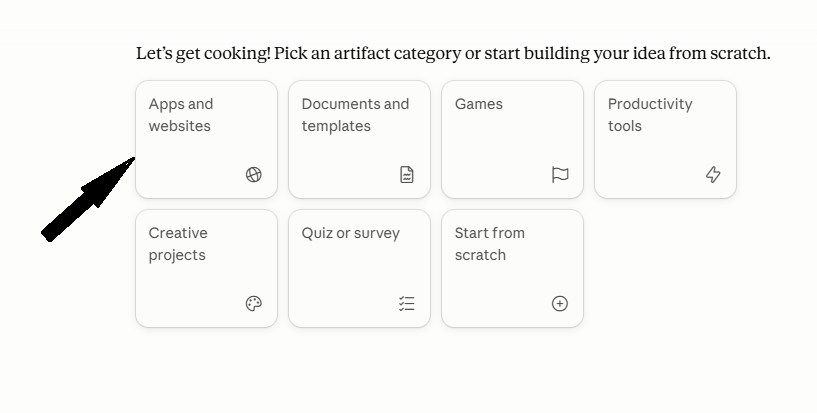
Step 3:
now select the suitable option for you according to your project, here we are creating personal portfolio so we will select app & website option.
Now you will get your workspace:
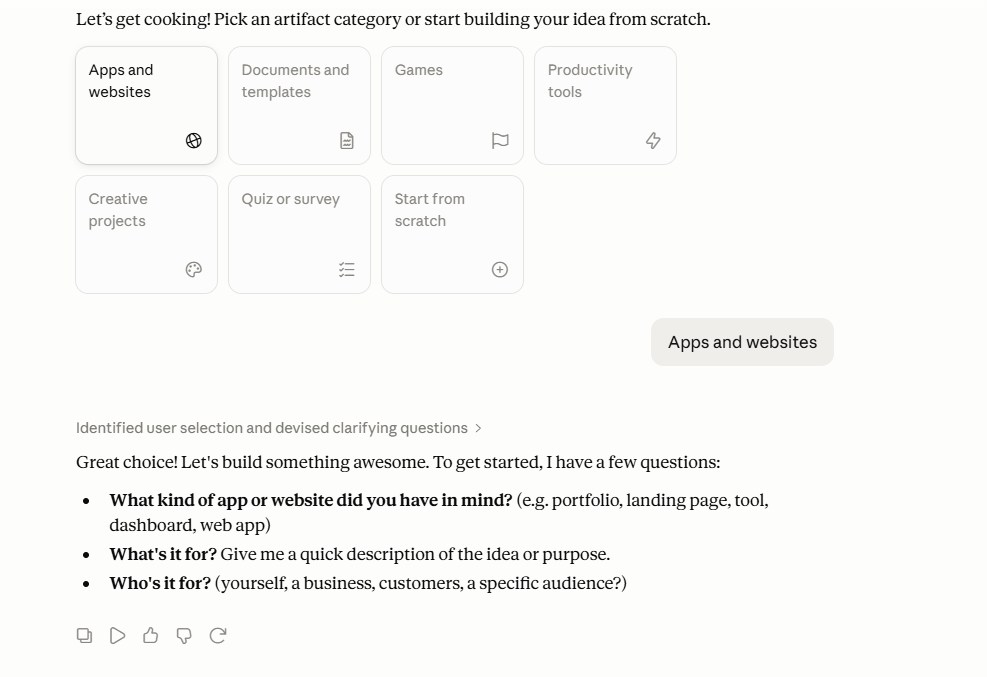
now you can simply response to the questions ask by the claude and by using some prompts you can built your portfolio .
