A Stored Procedure is a pre-written SQL query that is saved inside the database and can be executed whenever needed. Instead of writing the same SQL code again and again in your application, you store it once in the database and call it using its name.
Stored Procedures are commonly used in databases like Microsoft SQL Server, MySQL, Oracle Database, and PostgreSQL.
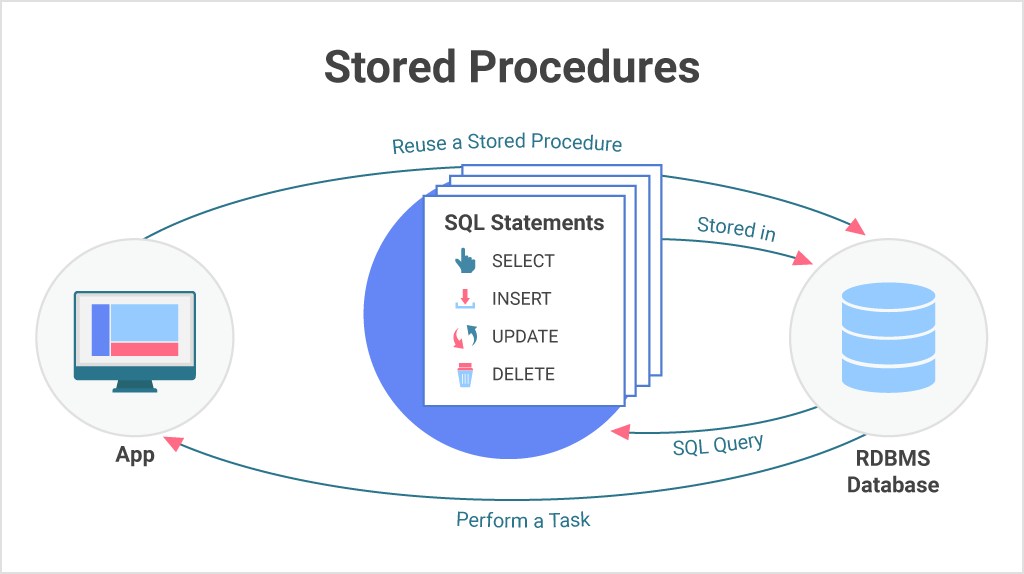
1. Simple Definition
A Stored Procedure is:
A group of SQL statements stored in the database that can be reused many times.
Example without Stored Procedure:
SELECT * FROM Users WHERE Id = 1Example with Stored Procedure:
CREATE PROCEDURE GetUserById
    @Id INT
AS
BEGIN
    SELECT * FROM Users WHERE Id = @Id
END
Execute:
EXEC GetUserById 12. Why Use Stored Procedure?
1. Reusability
You write the query once and use it many times.
Example:
- Login query
- Insert user
- Update profile
- Delete record
All can be stored in procedures.
2. Better Performance
Stored Procedures are compiled once and stored in execution plan cache. So execution is faster than normal query.
- Less parsing
- Less compilation
- Faster execution
3. Security
Stored Procedures help protect your database. Instead of giving table access:
Bad
SELECT * FROM UsersGood
EXEC GetUserById 1You can allow user to execute procedure but not access table.
This prevents:
- SQL Injection
- Direct table access
- Data misuse
4. Reduce Network Traffic
Without stored procedure:
- App → Send full SQL query every time
With stored procedure:
- App → Send only procedure name
Example:
- Big query sent every time
- Small command sent
EXEC GetUserById 1Less data transfer = Faster app
5. Easy Maintenance
If query changes:
- Without SP → change in many files
- With SP → change in one place
Example:
Old logic:
SELECT * FROM UsersNew logic:
SELECT Id, Name FROM UsersChange only in Stored Procedure.
6. Business Logic in Database
You can write logic inside Stored Procedure.
Example:
IF EXISTS (SELECT 1 FROM Users WHERE Email=@Email)
BEGIN
    PRINT 'User exists'
END
ELSE
BEGIN
    INSERT INTO Users(Name, Email)
    VALUES(@Name, @Email)
END
Useful for:
- Validation
- Calculations
- Conditions
- Transactions
7. Good for Large Applications
Large apps like:
- Banking
- ERP
- E-commerce
- Social media
- CMS
- Article / Blog websites
use Stored Procedures for:
- Speed
- Security
- Maintainability
- Control
3. Real Example (Interview Type)
Stored Procedure for login:
CREATE PROCEDURE LoginUser
    @Email NVARCHAR(100),
    @Password NVARCHAR(100)
AS
BEGIN
    SELECT Id, Name
    FROM Users
    WHERE Email=@Email AND Password=@Password
END
Call from C#:
cmd.CommandType = CommandType.StoredProcedure;
cmd.CommandText = "LoginUser";
4. Stored Procedure vs Query
| Feature | Query | Stored Procedure |
|---|---|---|
| Speed | Slow | Fast |
| Security | Low | High |
| Reuse | No | Yes |
| Maintenance | Hard | Easy |
| Network | More | Less |
| Logic support | Low | High |
5. When Should You Use Stored Procedure?
Use when:
- Large project
- Secure system
- Many queries repeat
- Complex logic
- Performance needed
Avoid when:
- Very small project
- Simple CRUD only
- Logic only in code
6. Conclusion
Stored Procedure is one of the most important features in SQL.
It helps in:
- Performance
- Security
- Reusability
- Clean architecture
- Professional database design
