If you are new to databases, the name Azure Cosmos DB might sound complicated. Don't worry.
In this blog, we'll understand Cosmos DB from the very beginning — what it is, why it exists, how it works, and when you should use it.
By the end, you should have a clear idea of what Cosmos DB is and why developers use it.
What is Cosmos DB?
Azure Cosmos DB is a database service provided by Microsoft Azure.
In simple words:
Cosmos DB is a cloud database designed to store and retrieve application data quickly, reliably, and at large scale.
For example, imagine you are building an online shopping application.
You might need to store:
- Customer information
- Products
- Orders
- Shopping carts
- Payments
- Reviews
All this information needs to be stored somewhere.
That "somewhere" is a database.
Cosmos DB is one option for storing this data.
First, What is a Database?
Before understanding Cosmos DB, let's understand the basic idea of a database.
Imagine you have a notebook.
You write:
Name: Rahul
Age: 25
City: Delhi
Then you write information about another person:
Name: Amit
Age: 30
City: Mumbai
A database does something similar, but electronically and at a much larger scale.
For example:
Users

ID    Name      Age    City
1     Rahul     25     Delhi
2     Amit      30     Mumbai
3     Priya     28     Pune
Applications use databases to save data and retrieve it when needed.
So, What Makes Cosmos DB Different?
There are many types of databases.
Some databases are designed mainly for traditional applications.
Others are designed for huge applications where users can be located around the world.
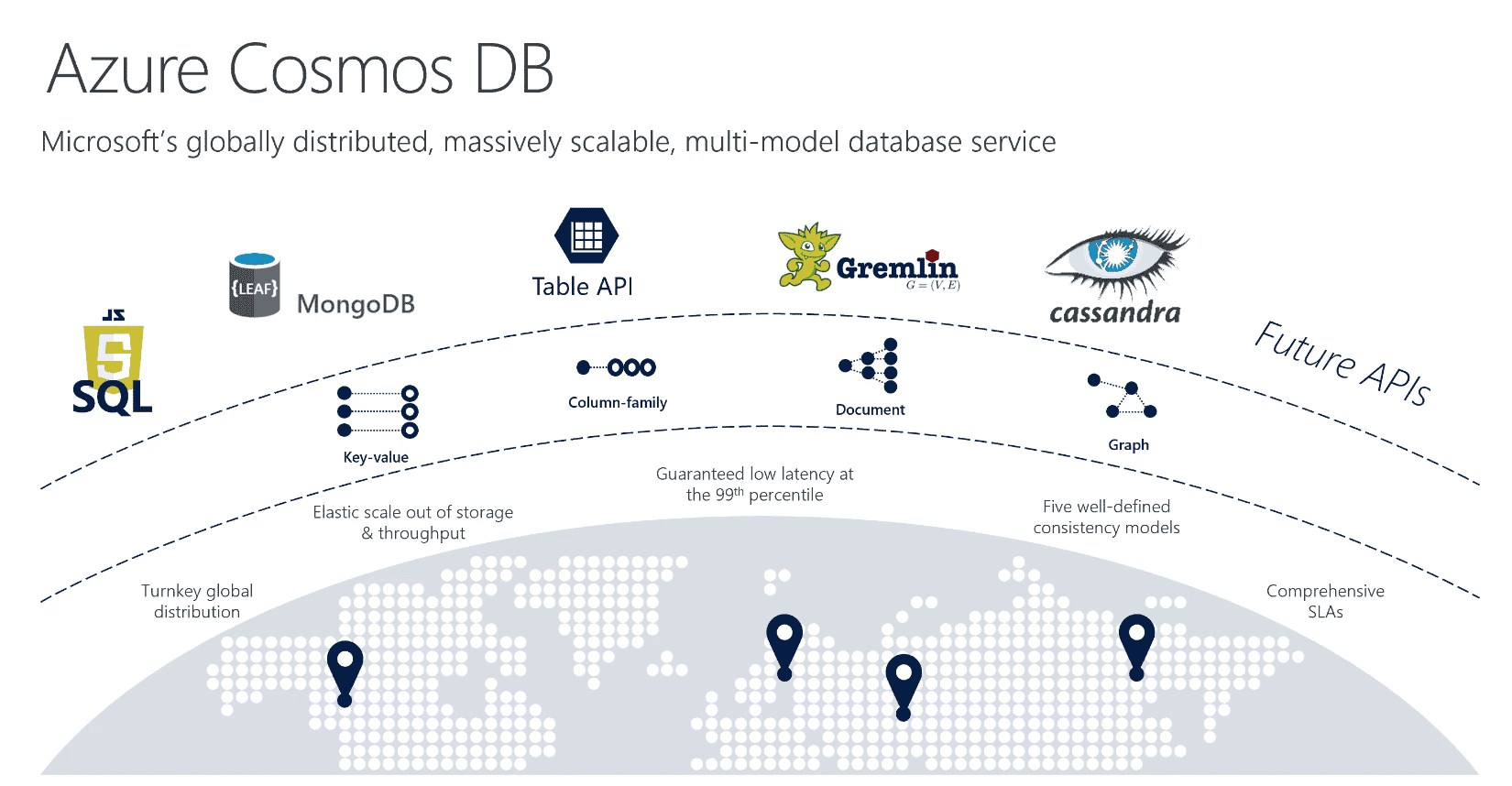
Cosmos DB is designed with global scale, low latency, availability, and flexible data models in mind.
For example, imagine you create an application used by people in:
- India
- USA
- UK
- Australia
- Japan
You want users to get data quickly regardless of where they are.
Cosmos DB can replicate data across different Azure regions.
So, instead of keeping everything in one location, you can distribute your data globally.
A Simple Real-Life Example
Imagine you own a pizza shop.
You have one shop in Delhi.
Someone from Mumbai orders a pizza.
The order information has to travel to your Delhi shop.
Now imagine you open another shop in Mumbai.
Mumbai customers can be served locally.
Now imagine you open shops in:
Delhi
Mumbai
London
New York
Tokyo
Customers can be served closer to where they live.
Cosmos DB works with a similar idea for data.
You can distribute your database across Azure regions so applications can access data closer to their users.
Is Cosmos DB SQL or NoSQL?
This is where beginners often get confused.
Cosmos DB is primarily known as a NoSQL database service, but it supports multiple APIs.
One of the commonly used APIs is the Azure Cosmos DB for NoSQL API.
For example, instead of storing data in traditional rows and columns, you can store JSON documents.
A user might look like this:
{
  "id": "101",
  "name": "Rahul",
  "age": 25,
  "city": "Delhi"
}
Another user could have different properties:
{
  "id": "102",
  "name": "Priya",
  "city": "Mumbai",
  "phone": "9876543210"
}
You don't necessarily need every document to have exactly the same structure.
This flexibility is one of the reasons developers choose NoSQL databases.
What is JSON?
If you are a beginner, you may be wondering about JSON.
JSON is simply a popular way of representing data.
For example:
{
  "name": "Rahul",
  "age": 25
}
Here:
nameis a propertyRahulis its valueageis another property25is its value
You will see JSON frequently when working with Cosmos DB.
Understanding Cosmos DB Structure
Now let's understand the basic building blocks.
A simplified Cosmos DB hierarchy looks like this:
Cosmos DB Account
       |
       ↓
    Database
       |
       ↓
   Container
       |
       ↓
     Items
Let's understand each one.
1. Cosmos DB Account
The Cosmos DB account is the main resource you create in Azure.
Think of it like a big building.
Inside the building, you can have multiple databases.
2. Database
Inside the account, you can create a database.
For example:
ECommerceDBThis database could contain data related to your shopping application.
3. Container
Inside the database, you create containers.
A container is where your actual data is stored.
For example:
ECommerceDB
     |
     +--- Products
     +--- Customers
     +--- Orders
In Cosmos DB for NoSQL, the container is roughly comparable to a table in a traditional relational database, although it works differently.
4. Item
An item is an individual JSON document stored inside a container.
For example:
{
  "id": "product-101",
  "name": "Laptop",
  "price": 55000
}
This is one item.
Another item might be:
{
  "id": "product-102",
  "name": "Mobile Phone",
  "price": 25000
}
So:
Account
   ↓
Database
   ↓
Container
   ↓
Items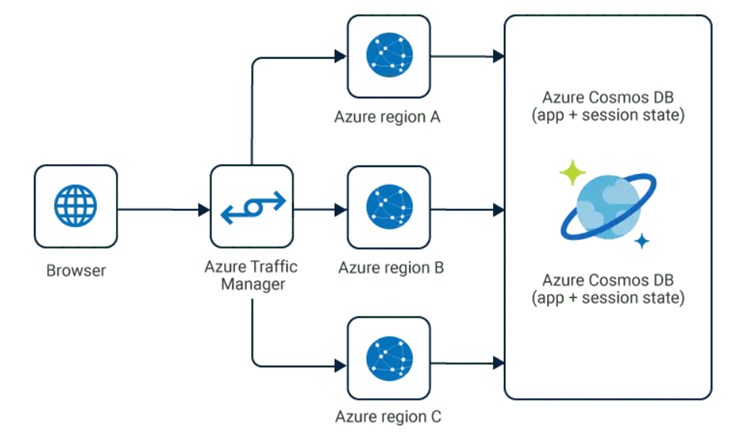
What is a Partition?
This is one of the most important Cosmos DB concepts.
If you're learning Cosmos DB for a job or interview, pay close attention to this section.
Imagine you have a huge library.
You have millions of books.
You don't want to put every book into one giant pile.
Instead, you divide the books into different sections.
Cosmos DB does something similar with data.
It divides data into logical partitions based on a partition key.
What is a Partition Key?
A partition key is a property that Cosmos DB uses to distribute your data.
Suppose we have customer data:
{
  "id": "101",
  "name": "Rahul",
  "city": "Delhi"
}
You could choose:
cityas a partition key.
Then data might logically be grouped like:
Delhi
Mumbai
Pune
Bangalore
However, choosing a partition key isn't simply about picking a convenient field.
A good partition key should help distribute data and workload effectively.
This is an important part of designing a Cosmos DB application.
Why is Partitioning Important?
Imagine you have:
1 million usersand all requests somehow concentrate on the same partition.
That partition can become very busy.
This is sometimes called a hot partition.
A good partition strategy helps distribute storage and traffic more evenly.
So when designing Cosmos DB applications:
Choose your partition key carefully.
What is RU/s?
Another important Cosmos DB concept is RU/s.
RU stands for:
Request Unit
Cosmos DB uses Request Units to measure the amount of resources required to perform database operations.
For example:
Simple read      → fewer RUs
Complex query    → more RUs
Large write      → more RUs
You can think of RU/s like the engine capacity available for database operations.
For example:
1000 RU/smeans the container has a certain provisioned throughput capacity of 1000 Request Units per second.
The actual RU cost depends on the operation, the size of the data, indexing, query complexity, and other factors.
Why Should I Care About RU/s?
Because Cosmos DB billing and performance are closely connected to throughput.
Suppose your application suddenly becomes popular.
Yesterday:
100 usersToday:
100,000 usersYour database workload can increase dramatically.
Cosmos DB provides different ways to manage throughput, including provisioned throughput and serverless options.
The appropriate choice depends on your workload.
What is Serverless Cosmos DB?
Suppose you're building a small application.
Maybe you don't have constant traffic.
You don't want to continuously provision a large amount of database throughput.
A serverless model can be useful for workloads with intermittent or unpredictable traffic.
For example:
Small application
      ↓
Occasional requests
      ↓
Serverless can be useful
For larger, consistently busy applications, provisioned throughput models may be more appropriate.
What is Global Distribution?
One of Cosmos DB's major features is global distribution.
Imagine your application has users in:
India
USA
UK
Japan
Australia
You can configure Cosmos DB to replicate data across multiple Azure regions.
Conceptually:
              Cosmos DB
                  |
       -------------------------
       |     |      |     |    |
     India  USA    UK   Japan  Aus
This can help users access data with lower latency.
It can also improve application availability.
What is Replication?
Replication means keeping copies of data in multiple locations.
For example:
Primary region
      ↓
Data replicated
      ↓
Other regions
If one region experiences a problem, applications can potentially fail over to another region, depending on how the account is configured.
This is useful for applications where availability is very important.
Consistency in Cosmos DB
Here's another concept that beginners should understand.
When data exists in multiple locations, you have to decide:
"How quickly should all copies of my data agree with each other?"
Cosmos DB provides different consistency levels.
The main levels are:
- Strong
- Bounded staleness
- Session
- Consistent prefix
- Eventual
You don't need to memorize them immediately.
Think about it like this:
Strong consistency
You want the latest data.
Write data
   ↓
Read data
   ↓
Get the latest value
Eventual consistency
Different copies may temporarily have different values, but they eventually become consistent.
Session consistency
This provides guarantees within a client session and is a commonly useful middle ground.
The important idea is:
More consistency can involve trade-offs with latency, availability, and global distribution.
Cosmos DB vs SQL Database
Beginners often ask:
"Should I use Cosmos DB or SQL Server?"
The answer depends on the application.
A traditional relational database such as Azure SQL Database is excellent when you need things such as:
- Strong relational modeling
- Tables and relationships
- Complex joins
- Transactions across related relational data
- Traditional SQL workloads
Cosmos DB can be attractive when you need:
- Flexible JSON/document data
- Massive scale
- Global distribution
- Low-latency access
- Horizontally scalable workloads
It's not about one database being universally better.
It's about choosing the right tool for the problem.
Cosmos DB Example
Let's say you're building a food delivery application.
You might store a restaurant like this:
{
  "id": "restaurant-101",
  "name": "Pizza House",
  "city": "Delhi",
  "rating": 4.5,
  "cuisine": "Italian"
}
An order might look like:
{
  "id": "order-501",
  "customerId": "customer-101",
  "restaurantId": "restaurant-101",
  "items": [
    {
      "name": "Margherita Pizza",
      "quantity": 2
    }
  ],
  "total": 500
}
Your application can store and query these documents through Cosmos DB.
How Does an Application Connect to Cosmos DB?
Your application communicates with Cosmos DB through an API/SDK.
For example:
Frontend
   ↓
Backend API
   ↓
Cosmos DB
   ↓
Data
A user might click:
"View My Orders"The backend receives the request.
It then queries Cosmos DB.
Cosmos DB returns the data.
The backend sends the result back to the frontend.
Can I Query Cosmos DB?
Yes.
With the Azure Cosmos DB for NoSQL API, you can use SQL-like queries.
For example:
SELECT *
FROM c
WHERE c.city = "Delhi"
This asks for documents where the city is Delhi.
You can also query specific fields:
SELECT c.name, c.price
FROM c
WHERE c.price < 50000
The exact query syntax and behavior depend on the Cosmos DB API you're using.
What APIs Does Cosmos DB Support?
Cosmos DB has evolved to support different data models and APIs.
Depending on the workload, you may encounter:
- Azure Cosmos DB for NoSQL
- Azure Cosmos DB for MongoDB
- Azure Cosmos DB for Apache Cassandra
- Azure Cosmos DB for Apache Gremlin
- Azure Cosmos DB for Table
You don't need to learn all of them at once.
If you're starting today, it's usually easiest to first understand the Cosmos DB for NoSQL/document model.
When Should You Use Cosmos DB?
Cosmos DB can be a good choice when your application needs things like:
1. Global users
Your application has users around the world.
2. Large scale
Your application needs to handle very large amounts of data and traffic.
3. Low latency
Your application needs fast access to data.
4. Flexible data
Your documents don't always have exactly the same structure.
5. High availability
Your application needs strong availability across regions.
Examples can include:
- E-commerce applications
- Gaming applications
- IoT systems
- Global web applications
- Personalization systems
- Real-time applications
- Large-scale mobile applications
When Might Cosmos DB NOT Be the Best Choice?
Don't choose Cosmos DB simply because it's a modern Azure service.
For example, if you have a small business application with:
Customers
Orders
Products
Invoices
and lots of relationships between these entities, a relational database may be a simpler and better fit.
The database should match your application's requirements.
Important Cosmos DB Terms to Remember
If you're preparing for interviews, understand these terms:
| Term | Simple Meaning |
|---|---|
| Account | Main Cosmos DB resource |
| Database | Logical collection of containers |
| Container | Stores your items |
| Item | Individual JSON document |
| Partition Key | Determines how data is logically partitioned |
| RU/s | Measure of database request capacity/cost |
| Region | Azure location where data can be hosted |
| Replication | Keeping data copies in multiple regions |
| Consistency | How quickly replicas agree |
| Indexing | Helps queries find data efficiently |
A Simple Mental Model
If all of this feels confusing, remember this picture:
              Azure Cosmos DB
                    |
                Account
                    |
                Database
                    |
                Container
                    |
             ----------------
             |      |       |
           Item   Item    Item
             |
        JSON Document
And for scaling:
                 Container
                     |
          -----------------------
          |          |          |
      Partition  Partition  Partition
          |          |          |
        Data       Data       Data
And for global distribution:
                 Cosmos DB
                     |
       --------------------------------
       |              |              |
     India            USA            UK
       |              |              |
     Data            Data           Data
That's the big picture.
Cosmos DB in One Sentence
If someone asks you in an interview:
"What is Azure Cosmos DB?"
You can answer:
Azure Cosmos DB is a globally distributed, scalable cloud database service from Microsoft Azure that supports flexible data models and is designed for low-latency, highly available applications.
That's a good beginner-level definition.
Final Thoughts
Cosmos DB can look complicated because it has many concepts:
- Containers
- Items
- Partitions
- Partition keys
- RU/s
- Consistency
- Replication
- Global distribution
But don't try to memorize everything on day one.
Start with this simple flow:
Application
    ↓
Cosmos DB
    ↓
Database
    ↓
Container
    ↓
JSON Documents
Then learn:
Documents
    ↓
Partition Key
    ↓
RU/s
    ↓
Consistency
    ↓
Global Distribution
Once you understand these concepts, Cosmos DB becomes much easier to work with.
The biggest beginner lesson is this:
Cosmos DB isn't just "a place to store JSON." Its real strength is designing a database that can scale globally while providing predictable performance and availability.
And when you learn Cosmos DB, don't focus only on creating a container and inserting a document.
Spend time understanding partitioning, throughput, indexing, consistency, and data modeling. Those concepts are what make you effective with Cosmos DB in real-world applications.
