Modern .NET applications rarely work alone. An ASP.NET Core application may communicate with payment gateways, third-party APIs, databases, cloud services, email providers, or other microservices.
Most of the time, these services work perfectly. But occasionally, something goes wrong.
An external API may temporarily return 503 Service Unavailable. A network connection may fail. A server may respond too slowly. Or a service may become overloaded.
Should your application immediately show an error to the user?
Not always.
This is where Polly comes in.
Polly is a .NET resilience library that provides strategies such as Retry, Circuit Breaker, Timeout, Fallback, Rate Limiting, and Hedging. Modern Polly uses a Resilience Pipeline to combine these strategies and apply them around your application operations.
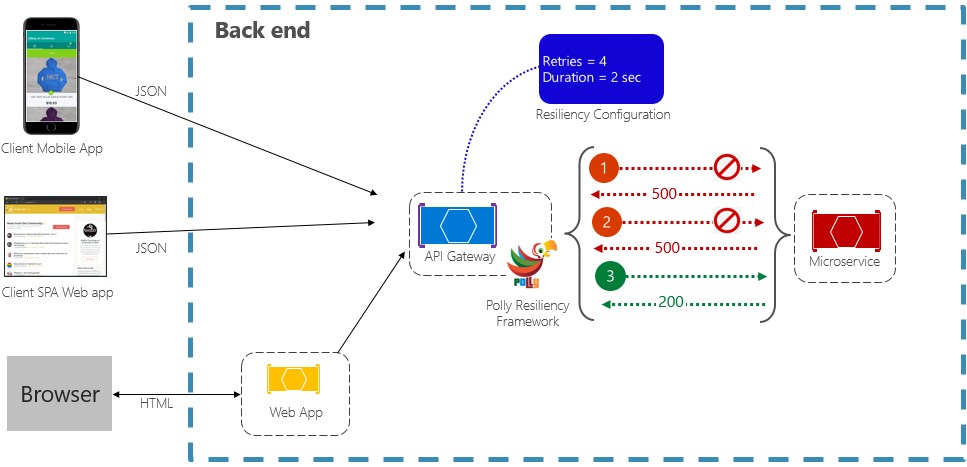
What Is Polly?
In simple terms:
Polly helps your .NET application handle temporary failures gracefully.
Imagine your application calls an external API:
ASP.NET Core Application
          |
          v
     External API
If the API temporarily fails:
Application
     |
     v
External API
     |
     X
   Failure
     |
     v
Application Error
With Polly, you can define what should happen:
Application
     |
     v
Polly Resilience Pipeline
     |
     v
External API
     |
     X
Temporary Failure
     |
     v
Retry
     |
     v
External API
     |
     v
Success
Instead of immediately failing, your application gets an opportunity to recover.
Why Do We Need Polly?
Consider a simple HTTP request:
// Create an HttpClient instance for making HTTP requests.
using var client = new HttpClient();

// Send a GET request to the external API.
var response = await client.GetAsync(
    "https://example.com/api/products");

// Throw an exception if the response indicates failure.
response.EnsureSuccessStatusCode();
- This code is perfectly valid.
But what happens if the server temporarily returns:
503 Service Unavailable- Your application may immediately fail.
- However, the service could recover one second later.
- This is called a transient failure.
Instead of:
Failure → Erroryou may want:
Failure
   ↓
Wait
   ↓
Retry
   ↓
Success
Polly helps you implement this kind of behavior without writing all the resilience logic yourself.
What Is Resilience?
Resilience means an application can handle failures and recover when possible.
For example:
External API temporarily fails
          ↓
Application detects the failure
          ↓
Applies a resilience strategy
          ↓
Operation succeeds- Resilience does not mean your application will never fail.
- It means your application knows how to react when something fails.
What Is a Transient Failure?
A transient failure is usually temporary.
Examples include:
- Temporary network failure
- HTTP
503 Service Unavailable - Temporary connection failure
- Temporary server overload
- Temporary timeout
- Short-lived cloud service failure
For example:
10:00:00 → API fails
10:00:01 → API fails
10:00:02 → API works- Retrying may make sense here.
But some errors should not be retried:
400 Bad Request
401 Unauthorized
403 Forbidden
Invalid data
Invalid payment information
Business validation error
A good resilience strategy distinguishes between temporary failures and permanent failures.
Polly Versions: What Should Beginners Learn?
If you search for Polly examples online, you may see older code such as:
// Older Polly APIs commonly used Policy objects.
Policy
Modern Polly introduced Resilience Pipelines.
The newer approach uses:
// Represents a reusable resilience pipeline.
ResiliencePipeline
and:
// Builds a resilience pipeline by adding strategies.
ResiliencePipelineBuilder
Polly's current documentation focuses on the modern pipeline model.
So, if you're learning Polly today, focus on Polly v8-style resilience pipelines.
Install Polly
For the core Polly API, install Polly.Core:
# Add the Polly core package to your .NET project.
dotnet add package Polly.Core
You can then use Polly from your C# application.
Your First Polly Example
Let's start with a simple retry pipeline.
// Import Polly's resilience pipeline APIs.
using Polly;

// Create a new resilience pipeline.
var pipeline = new ResiliencePipelineBuilder()

    // Add a retry strategy to retry failed operations.
    .AddRetry(new RetryStrategyOptions
    {
        // Allow the operation to be retried three times.
        MaxRetryAttempts = 3
    })

    // Build the configured pipeline.
    .Build();

// Execute an operation through the resilience pipeline.
await pipeline.ExecuteAsync(async cancellationToken =>
{
    // Call the operation that may temporarily fail.
    await CallExternalApiAsync(cancellationToken);
});
The basic idea is:
Create Pipeline
      ↓
Add Strategy
      ↓
Build Pipeline
      ↓
Execute Operation
Polly Resilience Strategies
The main strategies you should understand are:
| Strategy | What it does |
|---|---|
| Retry | Tries the operation again |
| Circuit Breaker | Stops calling an unhealthy service |
| Timeout | Prevents waiting too long |
| Fallback | Provides an alternative result |
| Rate Limiter | Controls the number of operations |
| Hedging | Uses an alternative operation when needed |
Polly categorizes these into reactive and proactive resilience strategies.
Let's understand each one.
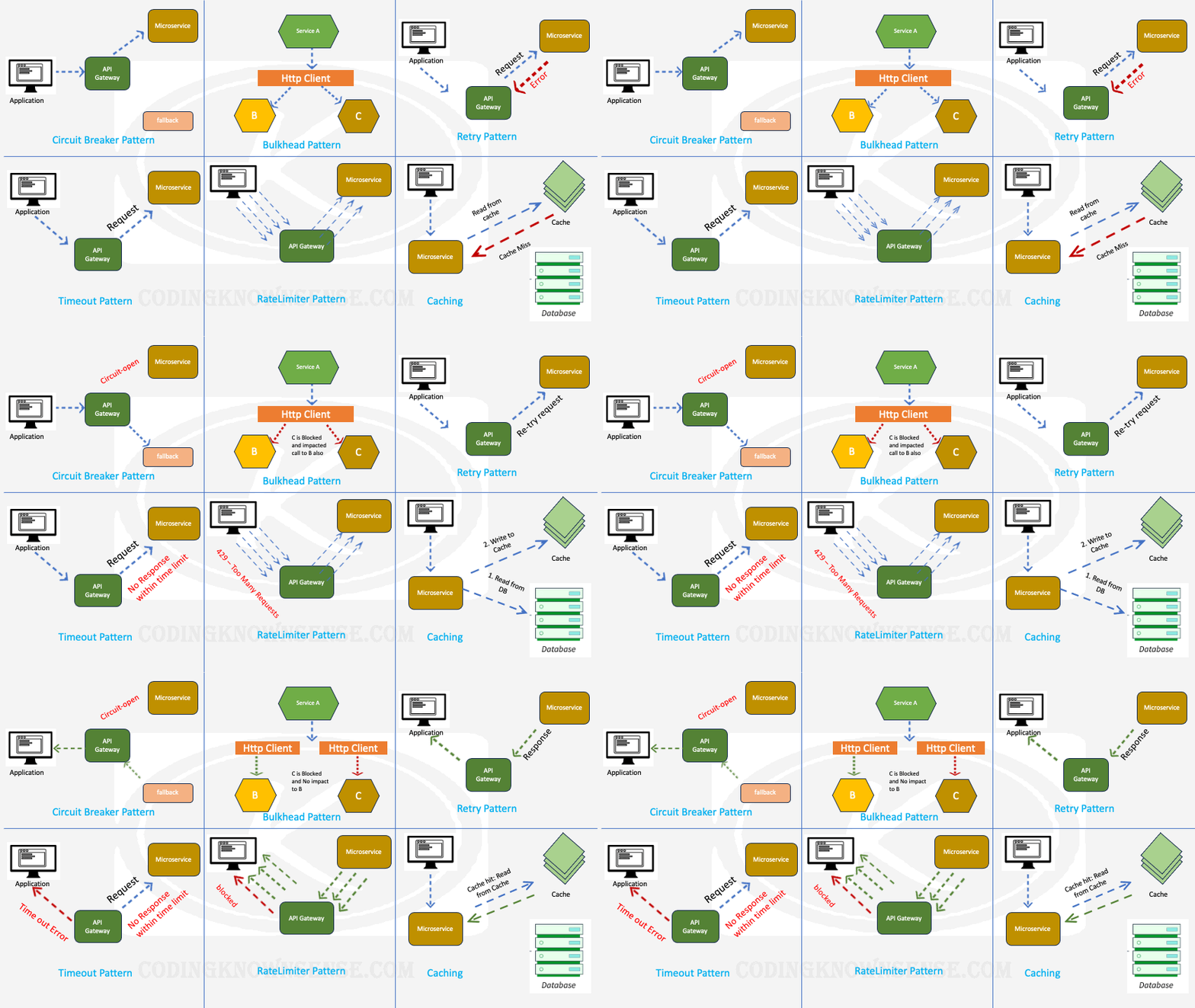
1. Retry
Retry is the easiest Polly concept.
It means:
If the operation fails temporarily, try it again.
Without retry:
Request
   ↓
Failure
   ↓
Error
With retry:
Request
   ↓
Failure
   ↓
Retry
   ↓
Failure
   ↓
Retry
   ↓
Success
Example:
// Import Polly APIs.
using Polly;

// Create a resilience pipeline.
var pipeline = new ResiliencePipelineBuilder()

    // Add a retry strategy.
    .AddRetry(new RetryStrategyOptions
    {
        // Allow up to three retry attempts.
        MaxRetryAttempts = 3,

        // Wait two seconds before retrying.
        Delay = TimeSpan.FromSeconds(2)
    })

    // Build the pipeline.
    .Build();

// Execute the external operation.
await pipeline.ExecuteAsync(async cancellationToken =>
{
    // Execute an operation that may temporarily fail.
    await CallExternalApiAsync(cancellationToken);
});
When Should You Use Retry?
Retry is useful when the failure is likely to disappear.
Good examples:
Temporary network failure
Temporary HTTP 503
Temporary connection failure
Temporary cloud-service failure
Don't blindly retry:
Invalid username/password
Invalid request
Permission denied
Invalid business data
Retrying a permanent error only wastes resources.
Retry With Exponential Backoff
Imagine an API is overloaded.
If thousands of clients immediately retry, they can create even more traffic.
Instead of:
2 sec
2 sec
2 sec
you can gradually increase the delay:
1 sec
2 sec
4 sec
8 sec
This is called exponential backoff.
// Import Polly APIs.
using Polly;

// Create a resilience pipeline.
var pipeline = new ResiliencePipelineBuilder()

    // Configure the retry strategy.
    .AddRetry(new RetryStrategyOptions
    {
        // Allow four retry attempts.
        MaxRetryAttempts = 4,

        // Increase the delay after each failed attempt.
        BackoffType = DelayBackoffType.Exponential,

        // Add randomness to the retry delay.
        UseJitter = true
    })

    // Build the pipeline.
    .Build();
What Is Jitter?
Imagine 1,000 application servers all fail at the same time.
If all of them retry exactly two seconds later:
Server 1 → retry at 2.0 sec
Server 2 → retry at 2.0 sec
Server 3 → retry at 2.0 sec
...
Server 1000 → retry at 2.0 sec
The external service suddenly receives another huge traffic spike.
Jitter adds some randomness to retry timing.
For example:
Server 1 → 2.1 sec
Server 2 → 2.7 sec
Server 3 → 2.3 sec
Server 4 → 3.0 sec
This spreads requests over time.
2. Circuit Breaker
- Retry is useful when you believe the service may recover.
- But what if the service is completely down?
- Continuously retrying isn't a good idea.
- This is where Circuit Breaker helps.
- Think about an electrical circuit breaker.
- When too much current flows, the breaker opens and stops the flow.
- Polly works similarly.
Normal
  ↓
Failures increase
  ↓
Circuit opens
  ↓
Requests stop
  ↓
Wait
  ↓
Test service
  ↓
Service recovered?
Polly's circuit breaker has three important states:
Closed
   ↓
Open
   ↓
Half-Open- Closed
- Everything is working normally.
- Open
- The dependency is considered unhealthy, so calls are blocked.
- Half-Open
- After the break duration, Polly allows an operation to test whether the dependency has recovered.
Circuit Breaker Example
// Import Polly APIs.
using Polly;

// Create a resilience pipeline.
var pipeline = new ResiliencePipelineBuilder()

    // Add a circuit breaker strategy.
    .AddCircuitBreaker(new CircuitBreakerStrategyOptions
    {
        // Open the circuit when 50% of sampled operations fail.
        FailureRatio = 0.5,

        // Evaluate failures over a ten-second period.
        SamplingDuration = TimeSpan.FromSeconds(10),

        // Require at least eight operations before evaluating failures.
        MinimumThroughput = 8,

        // Keep the circuit open for 30 seconds.
        BreakDuration = TimeSpan.FromSeconds(30)
    })

    // Build the pipeline.
    .Build();
Circuit Breaker and Retry solve different problems.
Retry:
Try again because the problem might be temporary.
Circuit Breaker:
Stop calling because the dependency appears unhealthy.
They can be combined when appropriate.
3. Timeout
- What if the external service doesn't fail?
- What if it simply takes too long?
For example:
Request
   ↓
Waiting...
   ↓
Waiting...
   ↓
Waiting...
   ↓
Waiting...
Your application should not wait forever.
A timeout means:
Stop waiting after a specified amount of time.
Example:
// Import Polly APIs.
using Polly;

// Create a resilience pipeline.
var pipeline = new ResiliencePipelineBuilder()

    // Stop an operation if it exceeds five seconds.
    .AddTimeout(TimeSpan.FromSeconds(5))

    // Build the pipeline.
    .Build();

// Execute the operation.
await pipeline.ExecuteAsync(async cancellationToken =>
{
    // Pass the cancellation token to the operation.
    await CallExternalApiAsync(cancellationToken);
});
Always pass the cancellation token to operations that support cancellation.
Polly's timeout strategy cancels execution after the configured timeout and can produce a
TimeoutRejectedException.
4. Fallback
- Sometimes retrying isn't enough.
- Suppose your product API is unavailable, but you have cached product information.
Instead of:
Product API
    ↓
Failure
    ↓
Error
you could use:
Product API
    ↓
Failure
    ↓
Cache
    ↓
Return cached products
That's a Fallback.
Fallback means:
If the primary operation cannot succeed, provide a safe alternative.
Example:
// Import Polly APIs.
using Polly;

// Create a typed pipeline because the operation returns a value.
var pipeline = new ResiliencePipelineBuilder<string>()

    // Add a fallback strategy.
    .AddFallback(new FallbackStrategyOptions<string>
    {
        // Handle exceptions from the primary operation.
        ShouldHandle = new PredicateBuilder<string>()
            .Handle<Exception>(),

        // Return this value when the primary operation fails.
        FallbackAction = static args =>
            Outcome.FromResultAsValueTask(
                "Service temporarily unavailable.")
    })

    // Build the pipeline.
    .Build();

// Execute the primary operation.
var result = await pipeline.ExecuteAsync(
    async cancellationToken =>
    {
        // Call the primary service.
        return await GetProductsAsync(cancellationToken);
    });
- Fallback is useful when you have a genuine alternative.
- Never use fallback to hide serious failures.
5. Rate Limiting
Suppose your application sends 10,000 requests per second, but the external API only accepts 100 requests per second.
Without protection:
Application
    ↓
10,000 requests
    ↓
External API
    ↓
429 Too Many Requests
A rate limiter controls how much traffic is allowed through the pipeline.
Application
    ↓
Rate Limiter
    ↓
Controlled requests
    ↓
External API
Rate limiting can protect both your application and downstream services.
6. Hedging
Hedging is a more advanced strategy.
Imagine you have two equivalent servers:
             Request
              /   \
             /     \
        Server A   Server B
             \     /
              \   /
             Response
- If one endpoint becomes unusually slow, an alternative execution can be used.
- Hedging can be useful in distributed systems where multiple equivalent endpoints exist.
- However, be very careful with operations that create side effects.
- For example, you should not casually send multiple payment requests.
Combining Polly Strategies
The real power of Polly comes from combining strategies.
For example:
Application
    ↓
Timeout
    ↓
Retry
    ↓
Circuit Breaker
    ↓
External API
A pipeline can look like this:
// Import Polly APIs.
using Polly;

// Create a resilience pipeline.
var pipeline = new ResiliencePipelineBuilder()

    // Retry temporary failures.
    .AddRetry(new RetryStrategyOptions
    {
        // Allow three retry attempts.
        MaxRetryAttempts = 3,

        // Use exponential backoff.
        BackoffType = DelayBackoffType.Exponential,

        // Add random delay to avoid synchronized retries.
        UseJitter = true
    })

    // Limit the duration of an execution.
    .AddTimeout(TimeSpan.FromSeconds(10))

    // Stop sending requests when the dependency is unhealthy.
    .AddCircuitBreaker(new CircuitBreakerStrategyOptions
    {
        // Break when the failure ratio reaches 50%.
        FailureRatio = 0.5,

        // Analyze failures over ten seconds.
        SamplingDuration = TimeSpan.FromSeconds(10),

        // Require eight operations before evaluating the ratio.
        MinimumThroughput = 8,

        // Keep the circuit open for 30 seconds.
        BreakDuration = TimeSpan.FromSeconds(30)
    })

    // Build the final pipeline.
    .Build();
- Don't add every strategy just because Polly supports it.
- Each strategy should solve a real problem.
Why Does Strategy Order Matter?
- Polly strategies are executed as a pipeline.
- The order can affect the behavior of the application.
For example, there is an important difference between:
5-second timeout per attemptand:
5-second timeout for the complete operation- when retries are involved.
- Therefore, don't randomly change the order of strategies.
- Define what you want the pipeline to accomplish first, then configure it accordingly.
Polly With HttpClient
One of the most common uses of resilience is HTTP communication.
For example:
ASP.NET Core
      ↓
HttpClient
      ↓
Payment API
Modern .NET provides Microsoft.Extensions.Http.Resilience, which integrates HTTP clients with the .NET resilience infrastructure built around Polly.
Microsoft recommends this approach for resilient
HttpClient applications.
Install the package:
# Install Microsoft's HTTP resilience integration.
dotnet add package Microsoft.Extensions.Http.Resilience
Then you can configure a resilient HTTP client:
// Register ProductClient with dependency injection.
builder.Services
    .AddHttpClient<ProductClient>(client =>
    {
        // Set the base address of the external API.
        client.BaseAddress =
            new Uri("https://api.example.com");
    })

    // Add Microsoft's standard HTTP resilience handler.
    .AddStandardResilienceHandler();
This is a very convenient option for typical HTTP scenarios.
Custom HttpClient Resilience
Sometimes you need custom behavior.
// Register the HTTP client.
builder.Services
    .AddHttpClient<ProductClient>(client =>
    {
        // Configure the external API address.
        client.BaseAddress =
            new Uri("https://api.example.com");
    })

    // Add a custom resilience pipeline to this HTTP client.
    .AddResilienceHandler("ProductApiResilience", pipeline =>
    {
        // Configure retry behavior.
        pipeline.AddRetry(new HttpRetryStrategyOptions
        {
            // Retry the request three times.
            MaxRetryAttempts = 3,

            // Use exponential backoff.
            BackoffType = DelayBackoffType.Exponential,

            // Add randomness to retry delays.
            UseJitter = true
        });

        // Stop an individual operation after ten seconds.
        pipeline.AddTimeout(TimeSpan.FromSeconds(10));
    });
This gives you more control when the default HTTP resilience configuration isn't appropriate.
Polly and Dependency Injection
In a real ASP.NET Core application, you generally want reusable resilience pipelines instead of creating them repeatedly.
For example:
// Register a named resilience pipeline.
builder.Services.AddResiliencePipeline(
    "external-api",
    pipeline =>
    {
        // Add retry behavior.
        pipeline.AddRetry(new RetryStrategyOptions
        {
            // Retry three times.
            MaxRetryAttempts = 3,

            // Use exponential backoff.
            BackoffType = DelayBackoffType.Exponential,

            // Add jitter to retry delays.
            UseJitter = true
        });

        // Add a five-second timeout.
        pipeline.AddTimeout(TimeSpan.FromSeconds(5));
    });
This allows your application to define resilience behavior centrally.
Different APIs May Need Different Resilience
Suppose your application communicates with:
Payment API
Product API
Shipping API
Email API
Search API
They don't necessarily need the same configuration.
For example:
Payment API
 → Conservative retry
 → Strict timeout
 → Circuit breaker

Product API
 → Retry
 → Cache fallback

Search API
 → Timeout
 → Possibly hedging

Email API
 → Retry
 → Rate limiting
Resilience should be designed according to the dependency.
The Most Important Topic: Retry and Idempotency
This is something every developer should understand before adding retries.
Imagine:
POST /api/payment- Your application sends a payment request.
- The payment server processes it successfully.
- But the network connection fails before your application receives the response.
Your application sees:
Request failedIf Polly retries:
POST /api/paymentthe payment could potentially be processed twice.
Therefore:
Not every operation is safe to retry.
Be especially careful with:
- Payments
- Orders
- Account creation
- Database writes
- Emails
- Other operations with side effects
For these operations, consider mechanisms such as:
- Idempotency keys
- Unique transaction IDs
- Server-side deduplication
- Database constraints
Polly can control the retry behavior, but your application must determine whether retrying is safe.
Common Polly Mistakes
1. Retrying Everything
- Don't retry every exception.
- A
400 Bad Requestusually won't become valid simply because you send it again.
2. Too Many Retries
- More retries do not automatically mean more reliability.
- Too many retries can cause:
- Increased latency
- Higher server load
- More resource consumption
- Traffic spikes
3. No Timeout
A retry without a sensible timeout can still make users wait too long.
For example:
30-second request
+
3 retries
=
Potentially very long wait
Think about the total time your user is willing to wait.
4. Retrying Non-Idempotent Operations
- Be particularly careful with payment and order operations.
- A retry can create duplicate side effects if the underlying operation isn't idempotent.
5. Using Fallback to Hide Errors
Bad:
Payment failed
    ↓
Return "Payment successful"
Good:
Recommendation API failed
    ↓
Return cached recommendations
A fallback must represent a valid alternative.
6. Using Polly for Everything
You don't need Polly for a simple calculation:
// Calculate a value locally without external dependencies.
var total = price * quantity;
There is normally no transient external failure to handle.
Always start with:
What can fail, and what should happen when it fails?
Polly Is Not a Magic Error Handler
Polly doesn't make an unavailable service magically available.
For example:
External API permanently down
        ↓
Retry
        ↓
Retry
        ↓
Retry
        ↓
Still down
Eventually the operation needs to fail.
Resilience means:
Fail safely
Recover when possible
Protect dependencies
Avoid unnecessary load
Provide a useful response
Monitoring Resilience
Adding Polly without monitoring isn't enough.
You should know:
How many retries occurred?
How many timeouts occurred?
How often did the circuit open?
How many fallbacks occurred?
How many requests were rate limited?
For example:
Product API
-----------------
Requests:       100,000
Retries:          2,500
Timeouts:           300
Circuit Opens:       12
Fallbacks:           150
If retries suddenly increase from:
2%to:
30%- there may be a serious problem with the external service.
- Polly should help you handle failures, not hide them.
When Should You Use Polly?
Polly is particularly useful when your application communicates with:
- REST APIs
- Payment services
- Cloud services
- Microservices
- Email providers
- Authentication services
- Shipping services
- Third-party APIs
- Other distributed systems
Use Polly when temporary failures are possible and automatic recovery is safe.
When Should You Not Use Polly?
Don't add resilience strategies just because they are available.
For example:
Simple calculation
Local string processing
Simple object mapping
Pure business logic
usually doesn't need retry or circuit breaking.
Polly is most valuable around operations that depend on resources that can temporarily fail or become unavailable.
Polly vs Writing Your Own Retry Loop
You could write your own retry loop:
// Try the operation up to three times.
for (int attempt = 1; attempt <= 3; attempt++)
{
    try
    {
        // Execute the operation.
        await CallApiAsync();

        // Exit the loop when the operation succeeds.
        break;
    }
    catch
    {
        // Wait before trying again.
        await Task.Delay(1000);
    }
}
This looks simple.
But real applications quickly need:
Retry conditions
Exponential backoff
Jitter
Timeout
Cancellation
Circuit breaker
Fallback
Rate limiting
Exception handling
Telemetry
That's where a dedicated resilience library becomes valuable.
A Practical ASP.NET Core Example
Imagine an ASP.NET Core application that calls an inventory service.
Architecture:
Client
  ↓
ASP.NET Core API
  ↓
InventoryClient
  ↓
Inventory API
Let's add retry and timeout.
// Register the inventory HTTP client.
builder.Services
    .AddHttpClient<InventoryClient>(client =>
    {
        // Configure the inventory API base address.
        client.BaseAddress =
            new Uri("https://inventory.example.com");
    })

    // Add a custom resilience pipeline for the inventory API.
    .AddResilienceHandler("InventoryResilience", pipeline =>
    {
        // Retry transient HTTP failures.
        pipeline.AddRetry(new HttpRetryStrategyOptions
        {
            // Allow three retry attempts.
            MaxRetryAttempts = 3,

            // Use exponential backoff.
            BackoffType = DelayBackoffType.Exponential,

            // Add randomness to retry timing.
            UseJitter = true
        });

        // Limit each operation to five seconds.
        pipeline.AddTimeout(TimeSpan.FromSeconds(5));
    });
Now the actual client can remain focused on its business responsibility:
// Define a client for communicating with the inventory service.
public class InventoryClient
{
    // Store the configured HttpClient.
    private readonly HttpClient _httpClient;

    // Receive HttpClient through dependency injection.
    public InventoryClient(HttpClient httpClient)
    {
        // Save the injected HttpClient.
        _httpClient = httpClient;
    }

    // Retrieve inventory information asynchronously.
    public async Task<string> GetInventoryAsync(
        int productId,
        CancellationToken cancellationToken)
    {
        // Build the inventory endpoint URL.
        var url = $"/api/inventory/{productId}";

        // Send the HTTP GET request.
        var response = await _httpClient.GetAsync(
            url,
            cancellationToken);

        // Throw an exception for an unsuccessful response.
        response.EnsureSuccessStatusCode();

        // Read and return the response content.
        return await response.Content.ReadAsStringAsync(
            cancellationToken);
    }
}
- Notice that the client doesn't contain retry loops.
- The resilience behavior is configured separately.
- This is one of the biggest advantages of using resilience pipelines.
How Should a Beginner Think About Polly?
Don't try to memorize every Polly configuration property.
Ask these questions.
Is this failure temporary?
Use:
- Retry
Is the dependency continuously failing?
Consider:
- Circuit Breaker
Can the operation take too long?
Use:
- Timeout
Do I have a safe alternative?
Consider:
- Fallback
Can too much traffic overload the dependency?
Consider:
- Rate Limiter
Do I have multiple equivalent endpoints and unpredictable latency?
Consider:
- Hedging
This mental model is more useful than memorizing APIs.
Simple Polly Decision Table
| Problem | Recommended Strategy |
|---|---|
| Temporary network error | Retry |
| Temporary HTTP 503 | Retry |
| Repeated dependency failures | Circuit Breaker |
| API responds too slowly | Timeout |
| Primary service unavailable | Fallback |
| Too many requests | Rate Limiter |
| One endpoint is unusually slow | Hedging |
Polly and Modern .NET
For modern .NET applications, you will encounter both Polly and Microsoft's resilience integration.
The ecosystem can be thought of like this:
Polly
  |
  +-- Polly.Core
  |
  +-- Microsoft.Extensions.Resilience
          |
          +-- Microsoft.Extensions.Http.Resilience
Microsoft.Extensions.Http.Resilience is especially useful when applying resilience to
HttpClient.
Microsoft's current .NET resilience documentation recommends these newer resilience packages and notes that the older
Microsoft.Extensions.Http.Polly package is deprecated.
Final Mental Model
If you're completely new to Polly, remember this:
                  Polly
                    |
        +-----------+-----------+
        |           |           |
      Retry      Timeout    Circuit Breaker
        |           |           |
     Try again   Don't wait   Stop calling
        |
        +------ Fallback
        |
        +------ Rate Limiter
        |
        +------ Hedging
And remember the main pipeline:
Your Application
       ↓
Resilience Pipeline
       ↓
External Dependency
The pipeline determines how your application should behave when that dependency becomes unreliable.
Conclusion
Polly is much more than a retry library.
It provides a structured way to build resilient .NET applications that can handle temporary failures, slow services, overloaded dependencies, and unavailable APIs.
The most important strategies to understand are:
- Retry — try again when a temporary failure may recover.
- Circuit Breaker — stop calling an unhealthy dependency.
- Timeout — don't wait indefinitely.
- Fallback — provide a safe alternative.
- Rate Limiter — control traffic.
- Hedging — use alternative executions when latency is a problem.
- Resilience Pipeline — combine strategies into a reusable pipeline.
The most important lesson for a beginner isn't remembering every Polly API.
It's asking:
What can go wrong with this operation, and what should my application do when it happens?
Once you start thinking this way, Polly becomes much easier to understand.
For modern ASP.NET Core applications, you can use Polly directly through resilience pipelines or use Microsoft's
Microsoft.Extensions.Resilience and Microsoft.Extensions.Http.Resilience integrations when they fit your architecture.
Good resilience isn't about hiding failures.
It's about handling failures intelligently.
