In today’s cloud-first world, developers want to focus more on building features and less on managing servers. This is where Azure App Service comes into play. It is one of Microsoft Azure’s most popular Platform as a Service (PaaS) offerings, designed to help you build, deploy, and scale web applications with ease.
Understanding Azure App Service
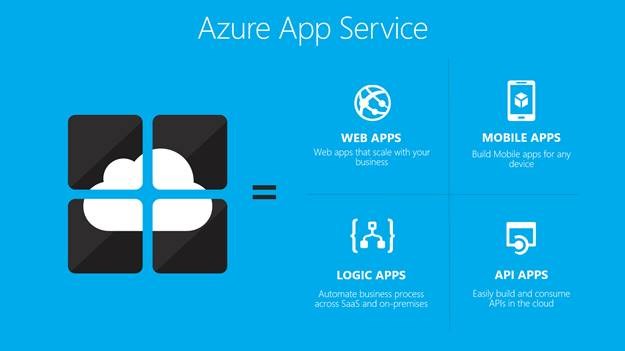
Azure App Service is a fully managed cloud platform that allows developers to host web applications, REST APIs, and backend services without worrying about infrastructure management such as servers, operating systems, or patching.
With Azure App Service, Microsoft handles:
- Server provisioning
- OS updates and security patches
- Load balancing
- High availability
You simply deploy your code and let Azure take care of the rest.
What Can You Host on Azure App Service?
Azure App Service supports a wide range of application types:
1. Web Applications
Host websites and web apps built using:
- ASP.NET / ASP.NET Core
- Java
- Node.js
- Python
- PHP
2. REST APIs
You can easily host backend APIs that serve mobile apps, SPAs, or third-party integrations.
3. Mobile App Backends
Azure App Service can act as a backend for mobile applications, handling authentication, data access, and business logic.
Key Features of Azure App Service
Fully Managed Platform
No need to manage virtual machines or servers. Azure handles infrastructure, scaling, and availability automatically.
Multiple Deployment Options
You can deploy applications using:
Built-in Scaling
Azure App Service supports:
- Vertical scaling (change pricing tier)
- Horizontal scaling (auto-scale based on traffic, CPU, memory, or schedules)
High Availability
Applications run in multiple instances across Azure data centers, ensuring minimal downtime.
Security and Compliance
- HTTPS by default
- Integration with Azure Active Directory
- Managed identities
- Compliance with industry standards like ISO, SOC, and GDPR
Monitoring and Diagnostics
Seamless integration with Azure Monitor and Application Insights for:
- Performance tracking
- Error logging
- Live metrics
- Application health monitoring
Azure App Service Plans Explained
An App Service Plan defines the resources your app uses, such as CPU, memory, and scaling options.
Common plan types include:
- Free / Shared – For testing and learning
- Basic – Low traffic applications
- Standard – Production workloads with auto-scaling
- Premium – High-performance and enterprise applications
- Isolated – Apps running in a dedicated Azure environment
Multiple applications can run under a single App Service Plan, sharing the same resources.
Benefits of Using Azure App Service
- Faster application deployment
- Reduced operational overhead
- Built-in scalability and reliability
- Strong security by default
- Seamless integration with other Azure services
When Should You Use Azure App Service?
Azure App Service is ideal when:
- You want a quick and reliable way to host web apps or APIs
- You don’t want to manage servers or infrastructure
- You need automatic scaling and high availability
- You are building cloud-native or enterprise applications
However, if you need full OS control, custom networking at a low level, or specialized workloads, virtual machines or Kubernetes may be a better fit.
Conclusion
Azure App Service simplifies application hosting by providing a powerful, secure, and scalable platform. Whether you are a startup launching your first product or an enterprise running mission-critical workloads, Azure App Service helps you focus on what matters most—building great applications.
It’s one of the fastest ways to go from code to cloud in the Azure ecosystem.
