Artificial Intelligence is transforming modern applications, and organizations are increasingly looking for secure, scalable, and enterprise-ready platforms to host AI models. Microsoft Azure provides a powerful ecosystem for deploying machine learning and generative AI models as APIs that can be consumed by web, mobile, desktop, and enterprise applications.
This guide explains how to host an AI model API in Azure, including prerequisites, required devices, Azure services, deployment steps, and testing procedures.

Why Host AI Models on Azure?
Azure offers several advantages for AI deployment:
- Enterprise-grade security
- Automatic scaling
- High availability
- Integration with Azure AI Services
- Monitoring and logging capabilities
- Global infrastructure
- Support for open-source and custom models
Whether you are deploying a machine learning model, a Large Language Model (LLM), or a computer vision solution, Azure provides the necessary tools for production deployment.
Requirements
Before starting, ensure you have the following:
Hardware Requirements
Development Device
You can use:
- Windows 10/11 PC
- Linux Machine
- macOS System
Recommended Specifications
| Component | Minimum | Recommended |
|---|---|---|
| CPU | Dual Core | Quad Core+ |
| RAM | 8 GB | 16 GB+ |
| Storage | 20 GB Free | 50 GB+ SSD |
| Internet | Stable Connection | High-Speed Broadband |
Software Requirements
Install the following tools:
1. Azure Subscription
Create an Azure account and activate a subscription.
Required permissions:
- Resource Group Creation
- Azure Machine Learning Access
- Azure Container Registry Access
2. Python
Recommended version:
Python 3.10+Verify installation:
python --version3. Azure CLI
Install Azure CLI and verify:
az versionLogin:
az login4. Visual Studio Code
Install:
- Python Extension
- Azure Extension Pack
Azure Services Required
The deployment uses the following Azure resources:
Azure Machine Learning Workspace
Used for:
- Model registration
- Training management
- Deployment
Azure Container Registry (ACR)
Stores Docker images.
Azure Kubernetes Service (AKS)
Provides scalable API hosting.
Azure Storage Account
Stores datasets and model artifacts.
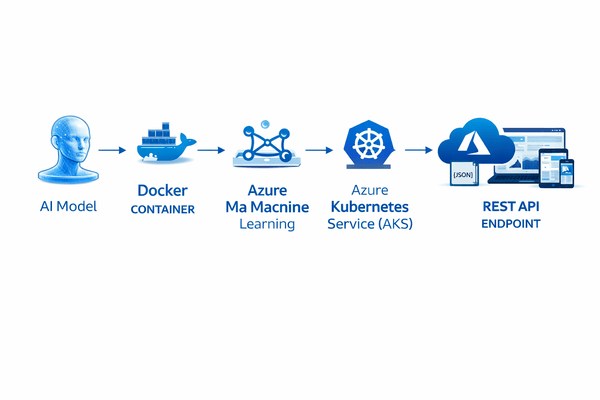
Architecture Overview
Client Application
        │
        ▼
Azure API Endpoint
        │
        ▼
Azure Kubernetes Service
        │
        ▼
Docker Container
        │
        ▼
AI Model
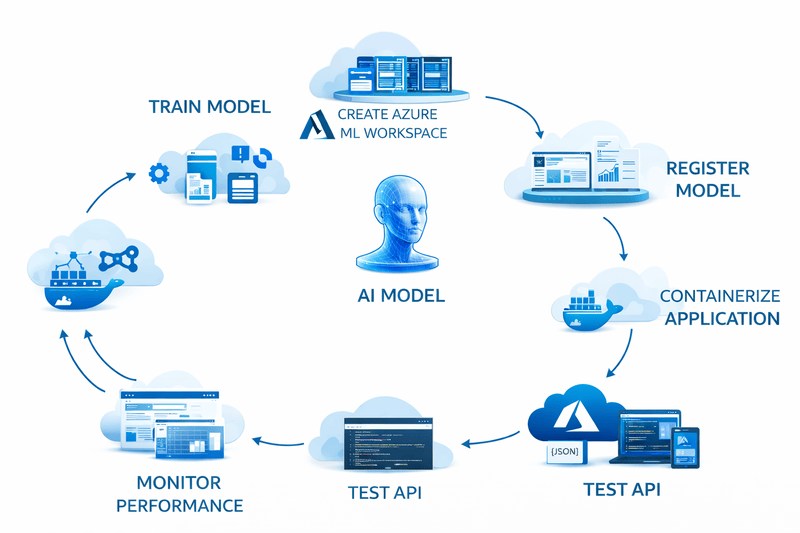
Step 1: Create a Resource Group
Navigate to Azure Portal.
Create a Resource Group:
az group create \
  --name ai-resource-group \
  --location centralindia
Output:
Resource Group Created SuccessfullyStep 2: Create Azure Machine Learning Workspace
Create workspace:
az ml workspace create \
  --name ai-workspace \
  --resource-group ai-resource-group
This workspace will manage all AI assets.
Step 3: Prepare the AI Model
Example:
from sklearn.linear_model import LogisticRegression

model = LogisticRegression()

# Train model
model.fit(X_train, y_train)

# Save model
import joblib
joblib.dump(model, "model.pkl")
Model file:
model.pkl
Step 4: Create Scoring Script
Create:
import json
import joblib

def init():
    global model
    model = joblib.load("model.pkl")

def run(raw_data):
    data = json.loads(raw_data)

    prediction = model.predict(
        [data["features"]]
    )

    return {
        "prediction": int(prediction[0])
    }
File name:
score.py
Step 5: Define Environment
Create:
name: ai-env

dependencies:
  - python=3.10
  - pip
  - pip:
      - scikit-learn
      - joblib
File:
environment.yml
Step 6: Register the Model
Python SDK example:
from azure.ai.ml import MLClient
from azure.identity import DefaultAzureCredential

client = MLClient(
    DefaultAzureCredential(),
    subscription_id,
    resource_group,
    workspace_name
)
Upload model:
client.models.create_or_update(...)
The model becomes available inside Azure Machine Learning.
Step 7: Create Endpoint
Create an online endpoint:
az ml online-endpoint create \
  --name ai-endpoint
Azure generates a secure REST URL.
Example:
https://ai-endpoint.region.inference.ml.azure.com
Step 8: Deploy the Model
Deployment YAML:
name: blue

endpoint_name: ai-endpoint

model:
  path: model.pkl

environment:
  conda_file: environment.yml

code_configuration:
  code: .
  scoring_script: score.py

instance_type: Standard_DS3_v2

instance_count: 1
Deploy:
az ml online-deployment create \
  --file deployment.yml
Deployment may take several minutes.
Step 9: Test the API
Create:
{
  "features": [1, 2, 3, 4]
}
Save as:
sample.json
Invoke:
az ml online-endpoint invoke \
  --name ai-endpoint \
  --request-file sample.json
Response:
{
  "prediction": 1
}
Step 10: Consume API from Application
Python Example:
import requests

url = "YOUR_ENDPOINT_URL"

headers = {
    "Authorization": "Bearer YOUR_KEY",
    "Content-Type": "application/json"
}

payload = {
    "features": [1, 2, 3, 4]
}

response = requests.post(
    url,
    json=payload,
    headers=headers
)

print(response.json())
Monitoring and Logging
Azure provides built-in monitoring through:
- Azure Monitor
- Application Insights
- Log Analytics
- Benefits:
- Request tracking
- Latency monitoring
- Error detection
- Resource utilization monitoring
Security Best Practices
Follow these recommendations:
Enable Authentication
Protect endpoints using:
- Azure Active Directory
- Managed Identity
- API Keys
Restrict Network Access
Use:
- Private Endpoints
- Virtual Networks
- Firewall Rules
Encrypt Data
Enable:
- TLS/HTTPS
- Storage Encryption
- Key Vault Secrets
Scaling the API
Azure supports automatic scaling.
Example:
Minimum Instances: 1
Maximum Instances: 10
Benefits:
- Handle traffic spikes
- Reduce downtime
- Optimize costs
Cost Optimization Tips
- Use serverless endpoints for small workloads.
- Shut down unused resources.
- Use autoscaling policies.
- Monitor usage regularly.
- Select appropriate VM sizes.
Common Deployment Issues
| Issue | Solution |
|---|---|
| Dependency Error | Verify environment.yml |
| Endpoint Failure | Check logs |
| Authentication Error | Regenerate API key |
| Slow Response | Increase instance count |
| Deployment Timeout | Increase resource limits |
Conclusion
Hosting AI model APIs in Azure enables organizations to deploy machine learning and generative AI solutions securely and at scale. By using Azure Machine Learning, Azure Container Registry, and Azure Kubernetes Service, developers can transform trained models into production-ready REST APIs that serve predictions in real time.
