As databases grow, a single table can quietly become your biggest bottleneck. Queries slow down, maintenance windows stretch, and simple operations like backups or deletes start to hurt. Table partitioning is a proven technique to keep large tables fast, manageable, and scalable—without changing how your application queries them.
This guide explains what table partitioning is, why it matters, how it works, and when (and when not) to use it.
What Is Table Partitioning?
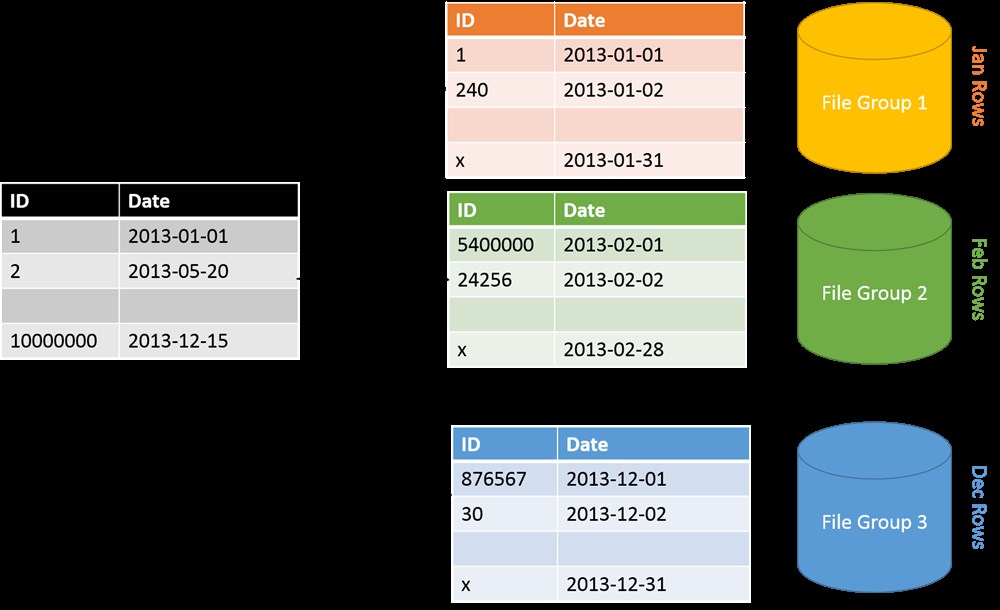
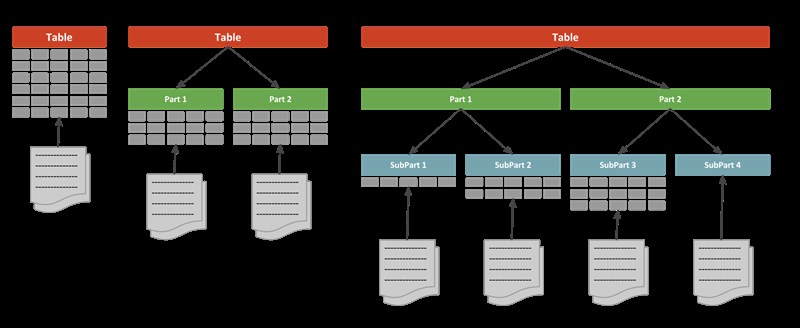
Table partitioning is the practice of dividing a large table into smaller, more manageable pieces called partitions, while still treating them as a single logical table.
From the application’s point of view:
- You query one table
- You insert into one table
From the database engine’s point of view:
- Data is stored in multiple physical segments
- Queries can target only the relevant partitions
Think of it like a library:
- One catalog (table)
- Many shelves (partitions)
- You only walk to the shelf that contains the book you need
Why Use Table Partitioning?
Partitioning is not just about size—it’s about performance, maintenance, and scalability.
1. Faster Queries
When queries include a partition key (for example, a date range), the database can skip irrelevant partitions. This is called partition pruning.
Instead of scanning millions of rows, the database scans only the partitions that matter.
2. Easier Data Management
With partitions, you can:
- Drop old data instantly (drop a partition instead of deleting rows)
- Archive historical data
- Rebuild or index individual partitions
This turns expensive operations into near-instant ones.
3. Improved Maintenance
Operations like:
- Index rebuilds
- Statistics updates
- Data purging
can be done per partition, reducing lock contention and downtime.
4. Better Scalability
As data grows over time, you add new partitions instead of redesigning tables or migrating data.
Common Partitioning Strategies
Choosing the right partitioning strategy is critical. Here are the most common approaches.
1. Range Partitioning
Data is divided based on a range of values—most commonly dates.
Example use case:
- Orders by order date
- Logs by created date
Typical ranges:
- Daily
- Monthly
- Yearly
This is the most widely used and beginner-friendly strategy.
2. List Partitioning
Each partition holds a predefined list of values.
Example use case:
- Country-based data
- Status-based data (Active, Archived, Deleted)
Each value belongs to exactly one partition.
3. Hash Partitioning
Data is distributed using a hash function on a column.
Example use case:
- Evenly distributing high-volume transactional data
- Avoiding hot spots when there’s no natural range
This improves write performance but offers limited pruning benefits for range queries.
4. Composite Partitioning
A combination of strategies, such as:
- Range partitioning by date
- Sub-partitioning by hash or list
Used in very large, high-throughput systems.
Partition Key: The Most Important Decision
The partition key determines how data is split. A bad choice can make partitioning useless—or even harmful.
A good partition key:
- Appears frequently in
WHEREclauses - Has a natural growth pattern (like time)
- Distributes data evenly
A poor partition key:
- Rarely used in queries
- Causes uneven data distribution
- Changes frequently
In practice, date/time columns are often the safest choice.
How Queries Work with Partitioned Tables
The key optimization is partition pruning.
When a query includes the partition key:
- The optimizer identifies relevant partitions
- Other partitions are ignored entirely
Example conceptually:
- Query last month’s data
- Database scans only last month’s partition
If the query does not include the partition key:
- The database may scan all partitions
- Performance can degrade
This is why query patterns matter as much as table design.
Indexing and Partitioning
Partitioned tables typically use partition-aligned indexes.
Benefits:
- Smaller indexes per partition
- Faster rebuilds
- Reduced locking
Common approaches:
- Local (partitioned) indexes
- Global indexes (used cautiously)
Best practice: align indexes with the partition strategy whenever possible.
Partitioning vs Sharding
These two concepts are often confused.
| Feature | Partitioning | Sharding |
|---|---|---|
| Scope | Single database | Multiple databases/servers |
| Complexity | Moderate | High |
| Transparency | Fully transparent to app | App-aware |
| Use case | Large tables | Massive scale systems |
Partitioning is usually the first step before sharding.
When You Should Use Table Partitioning
Partitioning is a good idea when:
- Tables grow into millions or billions of rows
- Most queries filter by a common column (often date)
- You need fast data purging or archiving
- Maintenance windows are becoming painful
When You Should Avoid It
Partitioning may be unnecessary or harmful when:
- Tables are small or medium-sized
- Queries rarely use the partition key
- Schema changes are frequent and unpredictable
- Your team lacks operational experience with partitions
Partitioning adds complexity—use it intentionally.
Real-World Use Cases
- Audit logs partitioned by day or month
- E-commerce orders partitioned by order date
- Analytics events partitioned by time
- Financial transactions partitioned by fiscal period
These systems benefit most from predictable growth and time-based queries.
Best Practices
- Start simple (range partitioning by date)
- Align queries with the partition key
- Monitor partition sizes regularly
- Automate partition creation and cleanup
- Test queries with realistic data volumes
Partitioning is not a magic switch—it’s a long-term design decision.
Final Thoughts
Table partitioning is one of the most powerful tools for managing large datasets inside a single database. Done right, it delivers faster queries, smoother maintenance, and predictable scalability. Done wrong, it adds complexity with little benefit.
If your data grows steadily and your access patterns are predictable, partitioning can turn a struggling table into a well-oiled machine.
