As databases grow, managing large tables becomes increasingly difficult. Queries slow down, maintenance takes longer, and data archiving becomes painful. One of the most effective techniques for handling large-scale data efficiently in SQL Server is Table Partitioning.
But static partitioning alone is not enough in real-world systems where data continuously grows. This is where Dynamic Table Partitioning becomes important.
What is Table Partitioning?
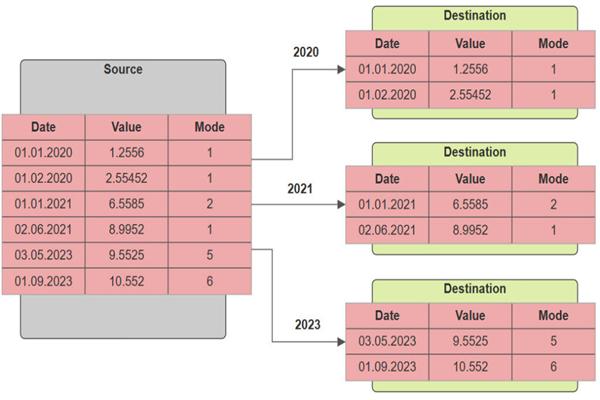
Table partitioning is a technique that divides a large table into smaller, manageable pieces called partitions while still appearing as a single table to users and applications.
Instead of storing all rows in one physical structure, SQL Server stores them across multiple partitions based on a partition key.
Common partition keys:
- Date
- Region
- Department
- Customer ID range
For example:
| Partition | Data |
|---|---|
| Partition 1 | 2023 Sales |
| Partition 2 | 2024 Sales |
| Partition 3 | 2025 Sales |
Applications still query one table, but SQL Server accesses only relevant partitions.
Why Dynamic Partitioning?
Static partitioning works initially, but over time:
- new months arrive
- old data needs archiving
- partitions become unbalanced
- manual maintenance increases
- Dynamic partitioning automates partition management.
It allows SQL Server systems to:
- automatically create new partitions
- merge old partitions
- archive historical data
- improve maintenance operations
- support sliding window scenarios
This is especially useful for:
- banking systems
- logging platforms
- IoT applications
- e-commerce systems
- analytics databases
Benefits of Dynamic Table Partitioning
1. Improved Query Performance
SQL Server uses partition elimination.
If a query requests:
WHERE OrderDate >= '2026-01-01'SQL Server scans only relevant partitions instead of the entire table.
2. Faster Maintenance
Operations like:
- index rebuilds
- backups
- archiving
- can be performed partition-wise.
Example:
ALTER INDEX ALL ON SalesTable
REBUILD PARTITION = 5;
3. Easy Archiving
Old partitions can be switched out quickly.
ALTER TABLE Sales
SWITCH PARTITION 1 TO Sales_Archive;
This operation is metadata-only and extremely fast.
4. Better Scalability
Partitioning allows tables with billions of rows to remain manageable.
Core Components of Partitioning in SQL Server
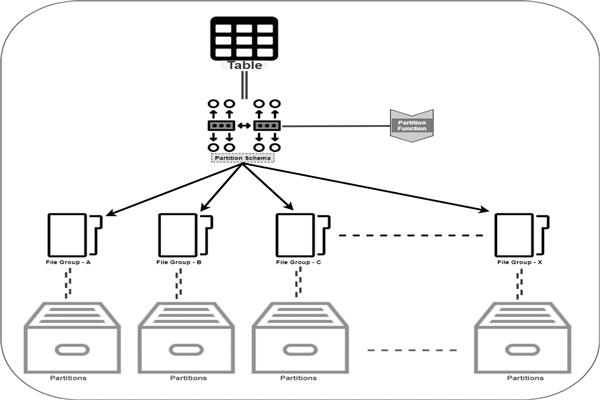
SQL Server partitioning mainly uses:
| Component | Purpose |
|---|---|
| Partition Function | Defines partition boundaries |
| Partition Scheme | Maps partitions to filegroups |
| Partitioned Table | Stores data across partitions |
Step 1: Create Filegroups (Optional)
ALTER DATABASE SalesDB
ADD FILEGROUP FG_2024;

ALTER DATABASE SalesDB
ADD FILEGROUP FG_2025;
Step 2: Create Partition Function
A partition function defines boundary values.
CREATE PARTITION FUNCTION pfSalesDate (DATE)
AS RANGE RIGHT FOR VALUES
(
    '2024-01-01',
    '2025-01-01',
    '2026-01-01'
);
Step 3: Create Partition Scheme
CREATE PARTITION SCHEME psSalesDate
AS PARTITION pfSalesDate
TO (FG_2023, FG_2024, FG_2025, PRIMARY);
Step 4: Create Partitioned Table
CREATE TABLE Sales
(
    SaleID INT,
    OrderDate DATE,
    Amount DECIMAL(10,2)
)
ON psSalesDate(OrderDate);
Now data automatically goes into the correct partition.
What Makes Partitioning Dynamic?
Dynamic partitioning means partitions are automatically managed over time.
This usually involves:
- adding future partitions
- removing old partitions
- automating partition scripts
- scheduled SQL Agent jobs
Sliding Window Technique
One popular dynamic strategy is the Sliding Window approach.
Example:
- Keep only last 3 years of data online
- Archive older data monthly
Process:
- Add new partition
- Switch out oldest partition
- Merge empty partition
Adding New Partitions Dynamically
ALTER PARTITION SCHEME psSalesDate
NEXT USED FG_2026;

ALTER PARTITION FUNCTION pfSalesDate()
SPLIT RANGE ('2027-01-01');
This creates a new partition for future data.
Removing Old Partitions
ALTER PARTITION FUNCTION pfSalesDate()
MERGE RANGE ('2024-01-01');
This removes an unused boundary.
Automating Dynamic Partitioning
Most production systems automate partition management using:
- SQL Server Agent Jobs
- Stored Procedures
- PowerShell scripts
Typical automation tasks:
- create monthly partitions
- archive historical data
- rebuild partition indexes
- update statistics
Real-World Example
Imagine an e-commerce company storing:
- millions of orders daily
- transaction logs
- customer activity
Without partitioning:
- queries become slower
- backups increase
- maintenance windows grow
With dynamic partitioning:
- monthly data is separated automatically
- old partitions archived easily
- queries scan only recent data
- maintenance becomes faster
Best Practices
Choose Correct Partition Key
Good partition keys:
- frequently filtered columns
- date columns
- evenly distributed values
Bad partition keys:
- random GUIDs
- highly skewed columns
Avoid Too Many Partitions
Too many partitions increase metadata overhead.
Recommended:
- monthly partitions for large systems
- yearly partitions for smaller systems
Align Indexes
Indexes should align with partition schemes.
CREATE CLUSTERED INDEX IX_Sales
ON Sales(OrderDate)
ON psSalesDate(OrderDate);
Monitor Partition Elimination
Use execution plans to ensure SQL Server scans only necessary partitions.
Maintain Statistics
Partitioned tables still require:
- statistics updates
- index maintenance
Challenges of Dynamic Partitioning
Although powerful, partitioning introduces complexity:
- administration overhead
- maintenance scripts
- partition management logic
- filegroup planning
- It is not always beneficial for small tables.
When to Use Dynamic Partitioning
Dynamic partitioning is ideal when:
- tables exceed millions of rows
- data grows continuously
- historical archiving is required
- queries are date-based
- maintenance windows are large
Avoid it for:
- small tables
- low-growth systems
- simple OLTP applications
Conclusion
Dynamic Table Partitioning is a powerful SQL Server feature for managing large datasets efficiently. It improves query performance, simplifies maintenance, enables fast archiving, and supports scalable enterprise systems.
By combining:
- partition functions
- partition schemes
- automation
- sliding window techniques
organizations can build highly scalable and maintainable database architectures.
For modern high-volume applications, dynamic partitioning is often not just an optimization — it becomes a necessity.
