Imagine it's Friday evening and your team has just finished a big new checkout flow. It's merged and tested, but you aren't sure it's ready for every customer. Do you hold the release? Do you deploy and hope?
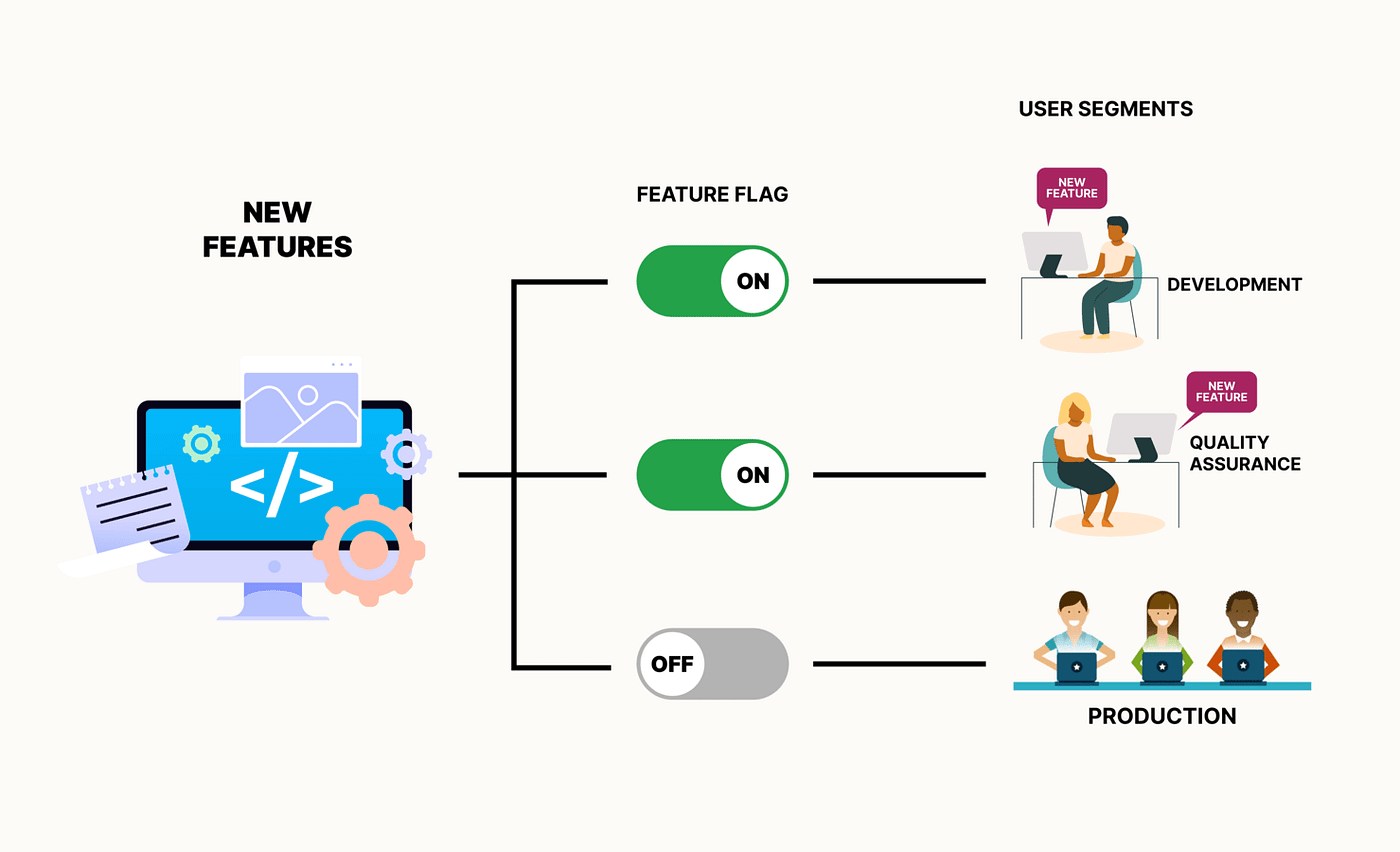
Feature flags (also called feature toggles) are the answer. They let you
ship code without exposing it, then switch it on for the right people at the right time, with no redeploy. This guide covers what feature flags are, the different types, how to implement them in ASP.NET Core with
Microsoft.FeatureManagement, and how to avoid the problems they can cause.
1. What is a feature flag?
A feature flag is a runtime condition that decides whether a piece of functionality is active:
if (await featureManager.IsEnabledAsync("NewCheckout"))
{
    // new behaviour
}
else
{
    // old behaviour
}
The flag's value lives outside the compiled code, in configuration, a database, or a cloud service. Changing the value changes the behaviour without a new build.
2. Why use feature flags?
| Benefit | What it means |
|---|---|
| Decouple deployment from release | Code reaches production on Tuesday. The feature is released to users on Thursday, when the business is ready. |
| Trunk-based development | Unfinished work is merged to main behind a flag. You avoid long-lived branches and painful merges. |
| Progressive rollout | Release to 1% of users, then 10%, then 100%, watching errors and metrics at each step. |
| Kill switch | If a feature misbehaves, switch it off in seconds instead of rolling back a deployment. |
| A/B testing | Show variant A to half the users and variant B to the rest, then compare results. |
| Targeted access | Beta testers, internal staff, a single tenant or a single country can see a feature first. |
| Safer testing in production | Verify a feature with real data for a small group before everyone gets it. |
3. Types of feature flags
Treating every flag the same is the first mistake teams make. Flags differ in purpose and lifetime:
- Release flags hide incomplete or new features. They are short-lived, so delete them after full rollout.
- Ops (kill-switch) flags let operations disable a heavy or risky component, such as a third-party call or an expensive report. They may live for a long time.
- Experiment flags drive A/B or multivariate tests. They last until the experiment ends.
- Permission/entitlement flags gate features by plan, role or tenant (for example, "Premium only"). They are often permanent.
Knowing the type tells you when to remove the flag.
4. Options in .NET
- Plain
IConfiguration/IOptions: aboolinappsettings.json. It's quick for a prototype but has no filters, no percentages and no cleanup discipline. Microsoft.FeatureManagement: Microsoft's official library. It has filters, targeting, ASP.NET Core integration and variants. This guide focuses on it.- Azure App Configuration: a managed store with a UI. It plugs into Microsoft.FeatureManagement and supports live refresh.
- Third-party platforms (LaunchDarkly, Unleash, Flagsmith, and others): they add analytics, audit logs and UIs.
- OpenFeature: a vendor-neutral standard with a .NET SDK. You can swap providers without changing application code.
- Custom provider: you build your own store, such as a database table with an admin screen. See section 15.
5. Getting started
Install the packages:
dotnet add package Microsoft.FeatureManagement.AspNetCore
Add flags to appsettings.json:
{
  "FeatureManagement": {
    "NewCheckout": true,
    "DarkMode": false
  }
}
Register the service in Program.cs:
using Microsoft.FeatureManagement;

var builder = WebApplication.CreateBuilder(args);

builder.Services.AddControllersWithViews();
builder.Services.AddFeatureManagement();   // reads the "FeatureManagement" section

var app = builder.Build();
AddFeatureManagement() reads the FeatureManagement section by default. You can pass a different
IConfiguration section if needed.
6. Avoid magic strings
Typos in flag names fail silently, because the flag is simply treated as disabled. Put names in one place:
public static class FeatureFlags
{
    public const string NewCheckout = "NewCheckout";
    public const string DarkMode    = "DarkMode";
}
Enums also work with [FeatureGate]. Pick one convention and stick to it.
7. Checking a flag in code
Inject IFeatureManager:
public class CheckoutService
{
    private readonly IFeatureManager _features;
    public CheckoutService(IFeatureManager features) => _features = features;

    public async Task<Order> PlaceOrderAsync(Cart cart)
    {
        if (await _features.IsEnabledAsync(FeatureFlags.NewCheckout))
            return await NewFlowAsync(cart);

        return await LegacyFlowAsync(cart);
    }
}
Evaluation is asynchronous because filters may call external systems, such as a database or a remote service.
IFeatureManagerSnapshot is the request-scoped version. It caches each flag's result for the lifetime of the request. This matters when a flag could change mid-request, for example during a live config refresh. Without a snapshot, the top of your request could take the "new" path and the bottom the "old" one. Inject
IFeatureManagerSnapshot in web request code to keep behaviour consistent.
8. Protecting controllers and actions with [FeatureGate]
[FeatureGate(FeatureFlags.NewCheckout)]
public class CheckoutController : Controller
{
    public IActionResult Index() => View();
}
If the flag is off, the framework returns 404 Not Found by default, so the endpoint appears not to exist. You can gate individual actions, or require several flags:
[FeatureGate(RequirementType.All, FeatureFlags.NewCheckout, FeatureFlags.DarkMode)]
RequirementType.Any (the default) needs at least one flag enabled.
All needs every flag enabled.
Custom response when a feature is off
Implement IDisabledFeaturesHandler if you want something other than a 404:
public class RedirectDisabledHandler : IDisabledFeaturesHandler
{
    public Task HandleDisabledFeatures(IEnumerable<string> features, ActionExecutingContext context)
    {
        context.Result = new RedirectToActionResult("ComingSoon", "Home", null);
        return Task.CompletedTask;
    }
}

builder.Services.AddFeatureManagement()
    .UseDisabledFeaturesHandler(new RedirectDisabledHandler());
9. Hiding UI in Razor views
Register the tag helper in _ViewImports.cshtml:
@addTagHelper *, Microsoft.FeatureManagement.AspNetCore
Then wrap markup:
<feature name="NewCheckout">
    <a asp-controller="Checkout" asp-action="Index">Try the new checkout</a>
</feature>

<feature name="NewCheckout" negate="true">
    <a asp-controller="Cart" asp-action="Legacy">Checkout</a>
</feature>
negate="true" shows the content when the flag is off. You can list several names with
requirement="All" or "Any".
10. Minimal APIs
Minimal APIs have no [FeatureGate], so inject the manager and check it directly:
app.MapGet("/api/reports/v2", async (IFeatureManager fm) =>
    await fm.IsEnabledAsync(FeatureFlags.NewReports)
        ? Results.Ok(new { version = 2 })
        : Results.NotFound());
For reuse across many endpoints, write an IEndpointFilter that takes a flag name and returns
Results.NotFound() when it's off.
11. Conditional middleware
Run a middleware only when a flag is on:
app.UseMiddlewareForFeature<ResponseCompressionExperimentMiddleware>("CompressionExperiment");
This works as a branch in the pipeline. Requests pass through the middleware only while the feature is enabled.
12. Feature filters: flags with conditions
So far the flags are plain on/off. Real rollouts need conditions, and that's what filters provide. A flag lists its filters in
EnabledFor:
"FeatureManagement": {
  "NewCheckout": {
    "EnabledFor": [
      { "Name": "Percentage", "Parameters": { "Value": 25 } }
    ]
  }
}
If any filter returns true, the feature is on. Set "RequirementType": "All" on the flag to require every filter to pass instead.
Register built-in filters that need explicit registration:
builder.Services.AddFeatureManagement()
    .AddFeatureFilter<PercentageFilter>()
    .AddFeatureFilter<TimeWindowFilter>();
12.1 Percentage filter
Enables the feature for a random percentage of evaluations. It works well for quick canary-style tests. It re-rolls on every evaluation, so the same user may see different behaviour between requests. For per-user stickiness, use targeting.
12.2 Time window filter
Enables the feature between two dates, for example a sale or a planned launch:
{
  "Name": "TimeWindow",
  "Parameters": {
    "Start": "Mon, 01 Dec 2026 00:00:00 GMT",
    "End": "Mon, 08 Dec 2026 00:00:00 GMT"
  }
}
Use the RFC 1123 date format shown, and remember times are UTC.
12.3 Targeting filter
This is the most useful filter for gradual rollouts. It enables a feature for specific users, groups and percentages, and the same user always gets the same result:
{
  "Name": "Targeting",
  "Parameters": {
    "Audience": {
      "Users": [
        "alice@example.com"
      ],
      "Groups": [
        {
          "Name": "Beta",
          "RolloutPercentage": 100
        },
        {
          "Name": "Staff",
          "RolloutPercentage": 50
        }
      ],
      "DefaultRolloutPercentage": 10,
      "Exclusion": {
        "Users": [
          "blocked@example.com"
        ]
      }
    }
  }
}
It needs to know who the current user is. Provide a targeting context accessor:
public class HttpTargetingContextAccessor : ITargetingContextAccessor
{
    private readonly IHttpContextAccessor _http;
    public HttpTargetingContextAccessor(IHttpContextAccessor http) => _http = http;

    public ValueTask<TargetingContext> GetContextAsync()
    {
        var user = _http.HttpContext!.User;
        return new ValueTask<TargetingContext>(new TargetingContext
        {
            UserId = user.Identity?.Name,
            Groups = user.FindAll(ClaimTypes.Role).Select(c => c.Value)
        });
    }
}

builder.Services.AddHttpContextAccessor();
builder.Services.AddFeatureManagement()
    .WithTargeting<HttpTargetingContextAccessor>();
The order of evaluation is exclusion, then listed users, then groups, then the default percentage. Rollout is hash-based, so a user who is inside the 10% stays inside it when you raise the value to 20%. Nobody flips back and forth.
13. Writing your own feature filter
When built-in filters don't fit, such as "only for tenant X" or "only in India", write a custom filter:
[FilterAlias("Country")]
public class CountryFilter : IFeatureFilter
{
    private readonly IHttpContextAccessor _http;
    public CountryFilter(IHttpContextAccessor http) => _http = http;

    public Task<bool> EvaluateAsync(FeatureFilterEvaluationContext context)
    {
        var settings = context.Parameters.Get<CountrySettings>() ?? new();
        var country = _http.HttpContext?.Request.Headers["X-Country"].ToString();
        return Task.FromResult(settings.Allowed.Contains(country));
    }
}

public class CountrySettings { public string[] Allowed { get; set; } = Array.Empty<string>(); }
Register it with .AddFeatureFilter<CountryFilter>(), then use it in configuration:
{
  "Name": "Country",
  "Parameters": {
    "Allowed": [
      "IN",
      "US"
    ]
  }
}
Contextual filters (IContextualFeatureFilter<TContext>) take the data to evaluate as a parameter instead of reading ambient state. You call
IsEnabledAsync("Feature", myContext). They are easier to unit test and don't depend on
HttpContext.
14. Changing flags without redeploying (live refresh)
A file in appsettings.json still needs a redeploy or restart to change. To change flags live, use a dynamic store such as Azure App Configuration:
builder.Configuration.AddAzureAppConfiguration(options =>
{
    options.Connect(builder.Configuration["AppConfig:ConnectionString"])
           .UseFeatureFlags(ff => ff.SetRefreshInterval(TimeSpan.FromSeconds(30)));
});

builder.Services.AddAzureAppConfiguration();
builder.Services.AddFeatureManagement();

var app = builder.Build();
app.UseAzureAppConfiguration();   // triggers the refresh check
The default refresh interval is 30 seconds. Flag lookups happen in the background, so request latency isn't affected. Pair this with
IFeatureManagerSnapshot for per-request consistency.
You don't need Azure for this. Any configuration source that reloads, such as a database provider, works because the feature manager reads from
IConfiguration.
15. Building a database-backed flag store
If you have an admin panel, you can manage flags from a UI. The extension point is
IFeatureDefinitionProvider:
public class DbFeatureDefinitionProvider : IFeatureDefinitionProvider
{
    public Task<FeatureDefinition> GetFeatureDefinitionAsync(string featureName) { /* load from DB (cache it) */ }
    public async IAsyncEnumerable<FeatureDefinition> GetAllFeatureDefinitionsAsync() { /* yield all */ }
}

builder.Services.AddSingleton<IFeatureDefinitionProvider, DbFeatureDefinitionProvider>();
builder.Services.AddFeatureManagement();
Keep these points in mind:
- Cache definitions (for example for 30 seconds). A database hit for every flag check will hurt performance.
- Audit every change: who, what, when.
- Restrict who can flip flags in production, using role permissions.
- Always give the code a safe default, so a failure to read the store results in "off".
16. Variants and experiments
Newer versions (4.x) add variants. A flag can return one of several named values, not just on/off. For example,
"Button": "Blue" | "Green" with a percentage split. You then read the assigned variant through
IVariantFeatureManager and use its configuration value. This is how you run multi-way experiments with the same targeting rules. Check the package docs for your installed version, because the configuration schema (feature_management with feature_flags) differs from the older FeatureManagement section.
17. Telemetry: measure what your flags do
A rollout without measurement is just a guess. Recent versions of the library can publish an event each time a flag is evaluated, including its variant. You can send these to Application Insights or any tracing system. Tag your logs and metrics with the flag state so you can answer questions like "Did errors rise for users who got NewCheckout?"
Even without the built-in support, log flag evaluations for important features.
18. Testing code with flags
Test both paths, enabled and disabled.
Unit test by mocking IFeatureManager:
var fm = new Mock<IFeatureManager>();
fm.Setup(f => f.IsEnabledAsync(FeatureFlags.NewCheckout)).ReturnsAsync(true);
var sut = new CheckoutService(fm.Object);
Integration test by overriding configuration in WebApplicationFactory:
builder.ConfigureAppConfiguration((_, cfg) =>
    cfg.AddInMemoryCollection(new Dictionary<string, string?>
    {
        ["FeatureManagement:NewCheckout"] = "true"
    }));
19. Best practices
- Default to off. A new flag should be disabled everywhere until you deliberately turn it on. A missing flag must also mean "off".
- Give each flag an owner and a removal date. Flags without an owner are never cleaned up.
- Delete release flags quickly. Once a feature is at 100% and stable, remove the flag and the old code path. Stale flags are technical debt.
- Keep flag checks at the edges. Decide once at a controller, service or factory, and call different implementations. Scattering
if (flag)through business logic makes code unreadable. Use the strategy pattern or dependency injection to swap implementations. - Avoid nested and interdependent flags. Flag A requires B, which requires C, produces combinations nobody has tested.
- Use clear names. Prefer
NewCheckoutoverFlag12orTestFeature. Name flags after the capability, not the state ("UseNewCheckout", not "OldCheckoutOff"). - Don't use flags for security. A flag is not authorization. Hiding a button doesn't protect the endpoint behind it. Keep real permission checks in place.
- Handle database changes safely. Use the expand/contract pattern. Add new columns first, write to both, then switch the flag, then drop the old column in a later release. A flag can switch code instantly but cannot undo a destructive migration.
- Make it observable. Log flag state with errors and track who changes flags and when.
- Control who can change flags. Production flag changes are production changes. Use permissions, approvals and an audit trail.
- Test in both states and in combination for flags that interact.
- Don't evaluate repeatedly in hot loops. Evaluate once per request or operation, and reuse the result.
20. Common pitfalls
- Flag debt: hundreds of old flags nobody dares to remove.
- Typos: a misspelled name means the flag is silently off. Use constants.
- Inconsistent behaviour within a request when config refreshes mid-request. Use
IFeatureManagerSnapshot. - Percentage filter and "sticky" expectations: if users must keep the same experience, use targeting.
- Forgetting UTC in time-window filters.
- Different environments, different values: staging passes with a flag on, production runs with it off. Keep per-environment config explicit and visible.
- Flag as permanent config: if a "flag" is permanent behaviour, such as a plan entitlement, treat it as a proper setting or permission instead.
21. Flag lifecycle at a glance
- Create: the flag is off by default, with an owner and a purpose.
- Develop: merge code behind the flag.
- Test: turn it on in dev and staging.
- Roll out: internal users, then 1%, 10%, 50%, 100%, while monitoring.
- Stabilize: confirm metrics are healthy.
- Retire: remove the flag, the old code path and the configuration entry.
Conclusion
Feature flags turn releasing from a risky event into a routine, controllable action. With
Microsoft.FeatureManagement in ASP.NET Core you get a good set of tools. Boolean flags handle simple cases,
[FeatureGate] and the <feature> tag helper protect actions and UI, and filters cover time windows, percentages and per-user targeting. Custom filters and providers handle the rest, and live refresh lets you change behaviour without redeploying.
Flags are only useful if you manage them well. Name them clearly, default them to off, assign owners, measure their effect, and delete them once they've done their job. Start with one flag on your next risky feature and add targeting once you're comfortable.
I wrote this inline rather than saving it to a file. If you want it as a file or a doc, I can do that. I can also trim it to a shorter post, or add a worked example based on your admin panel's flags, such as a database-backed flag store with an admin screen.
