In database systems, automation is very important. Many tasks such as backups, data cleanup, report generation, and data synchronization need to run automatically without manual execution. In SQL Server, this automation is done using SQL Jobs.
SQL Jobs are created and managed using Microsoft SQL Server through the SQL Server Agent service.
1. What is SQL Job?
A SQL Job is an automated task that runs at a scheduled time or on a specific event in SQL Server.
It allows you to run:
- SQL queries
- Stored procedures
- Backups
- Scripts
- SSIS packages
- Maintenance tasks
- without running them manually.
Example
- Run backup every night at 12 AM
- Delete old records every Sunday
- Send report every day
- Update summary table every hour
- All these can be done using SQL Jobs.
2. What is SQL Server Agent?
- SQL Jobs work only when SQL Server Agent is running.
- SQL Server Agent is a background service in SQL Server that executes scheduled jobs.
Uses of SQL Server Agent
- Run scheduled jobs
- Run alerts
- Run maintenance plans
- Run automation tasks
- If SQL Server Agent is stopped → Jobs will not run.
3. Where SQL Jobs are Used
SQL Jobs are commonly used in real projects.
| Use Case | Example |
|---|---|
| Backup | Daily database backup |
| Data cleanup | Delete old logs |
| Report generation | Daily sales report |
| Data sync | Copy data to another DB |
| Index rebuild | Improve performance |
| Email sending | Send alerts |
4. Components of SQL Job
A SQL Job has multiple parts.
1. Job
The main container.
2. Step
Each job can have multiple steps.
Example:
- Step 1 → Backup DB
- Step 2 → Delete old files
- Step 3 → Send email
3. Schedule
Defines when job will run.
Examples:
- Daily
- Weekly
- Monthly
- Every 5 minutes
On server start
4. Alerts (optional)
Run job when error occurs.
5. How to Create SQL Job (Step by Step)
Open SQL Server → Expand SQL Server Agent → Jobs
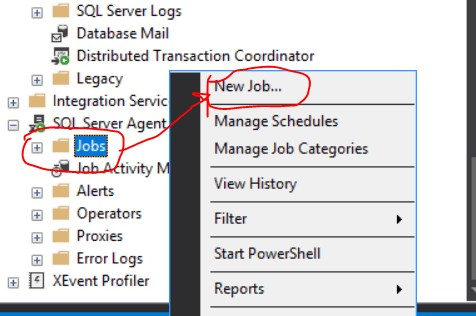
Steps:
- Open SSMS
- Go to SQL Server Agent
- Right click → New Job
- Enter Job Name
- Add Step
- Add Schedule
- Click OK
Job created.
6. Example – SQL Job to Delete Old Records
DELETE FROM Logs
WHERE CreatedDate < DATEADD(DAY, -30, GETDATE())
Schedule:
Run every day at 1 AM
This job will delete records older than 30 days.
7. Example – SQL Job for Backup
BACKUP DATABASE MyDB
TO DISK = 'D:\Backup\MyDB.bak'
WITH FORMAT
Schedule:
Daily at 12 AM
8. Why Use SQL Jobs?
- Automation
- No manual work
- Time saving
- Runs automatically
- Performance
- Run heavy tasks at night
- Maintenance
- Keep DB clean
- Reliability
- Runs even if user not logged in
9. SQL Jobs in Real Projects
In real companies SQL Jobs are used for:
- Night backup
- Data warehouse load
- Report generation
- Email alerts
- Log cleanup
- API sync data
- Index rebuild
- Cache refresh
Every production system uses SQL Jobs.
10. When NOT to Use SQL Jobs
- Small queries manually run
- One time script
- Application-level logic
- Use SQL Jobs only for automation.
11. Conclusion
SQL Jobs are used to automate database tasks in SQL Server.
They help in backups, cleanup, reports, and maintenance.
Using SQL Jobs makes system:
- Faster
- Reliable
- Automatic
- Production ready
Every SQL Developer should know SQL Jobs.
