1. What is SQL Transaction?
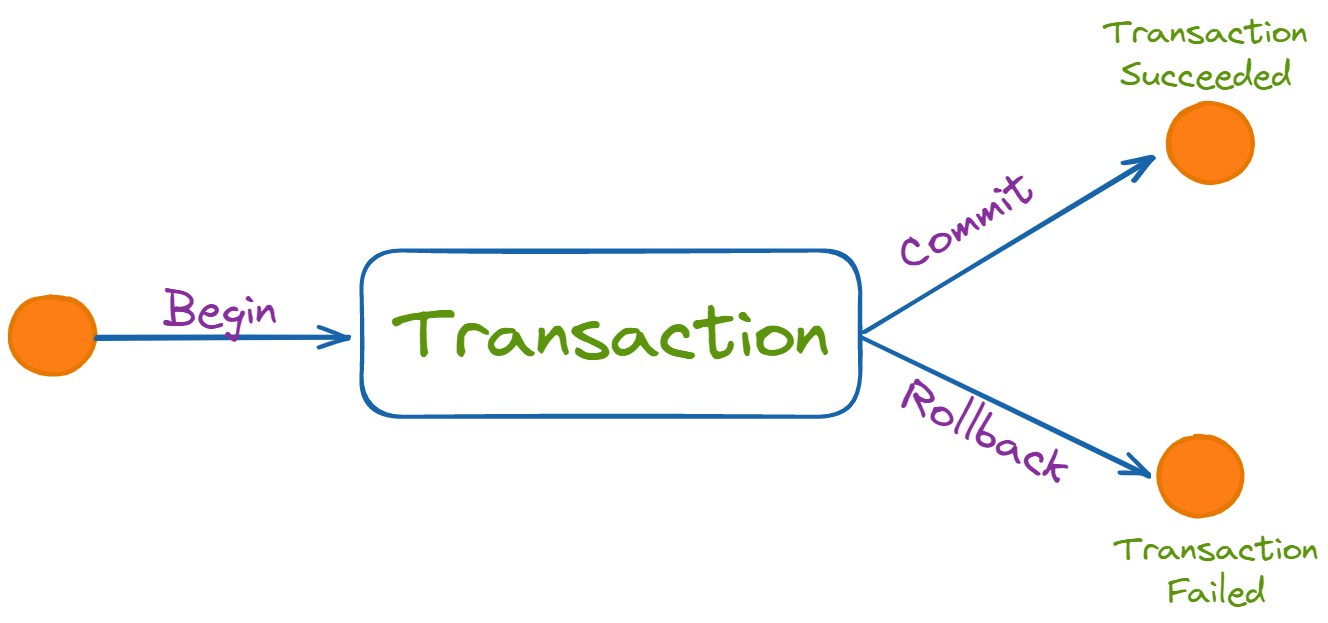
In SQL, a Transaction is a group of one or more SQL statements that are executed as a single unit of work.
A transaction ensures that data remains consistent, safe, and reliable in the database.
- If all queries run successfully → changes are saved
- If any query fails → all changes are undone
Transaction is mainly used in:
- Banking systems
- Payment systems
- Order processing
- Inventory management
- Large enterprise applications
Example:
BEGIN TRANSACTION;

UPDATE Accounts SET Balance = Balance - 1000 WHERE Id = 1;
UPDATE Accounts SET Balance = Balance + 1000 WHERE Id = 2;

COMMIT;
Here, money is transferred from one account to another.
If one query fails, the transaction should not complete.
2. Why SQL Transaction is Important?
Without transaction:
- Data may become inconsistent
- Partial updates may occur
- System may crash in middle
With transaction:
- Data is safe
- Errors can be rolled back
- Multiple users can work safely
Example problem without transaction:
UPDATE Accounts SET Balance = Balance - 1000 WHERE Id = 1;
-- system crash here
UPDATE Accounts SET Balance = Balance + 1000 WHERE Id = 2;
- Money deducted but not added → Wrong data
- Transaction solves this.
3. ACID Properties of Transaction
SQL Transaction follows ACID rules
- Atomicity
- All queries execute or none.
- Consistency
- Database always remains valid.
- Isolation
- Multiple transactions do not affect each other.
- Durability
- Once committed, data is saved permanently.
Example:
BEGIN TRANSACTION;

INSERT INTO Orders VALUES (1, 'Laptop', 50000);

COMMIT;
After commit, data will stay even if server stops.
4. Transaction Commands in SQL
| Command | Meaning |
|---|---|
| BEGIN TRANSACTION | Start transaction |
| COMMIT | Save changes |
| ROLLBACK | Undo changes |
| SAVEPOINT | Create checkpoint |
| RELEASE SAVEPOINT | Remove checkpoint |
5. BEGIN TRANSACTION Example
BEGIN TRANSACTION;

UPDATE Products
SET Price = Price - 100
WHERE Id = 10;

COMMIT;
Transaction starts with BEGIN and ends with COMMIT.
6. ROLLBACK Example
Rollback cancels changes.
BEGIN TRANSACTION;

UPDATE Products
SET Price = Price - 100
WHERE Id = 10;

ROLLBACK;
Price will not change.
7. COMMIT Example
Commit saves changes permanently.
BEGIN TRANSACTION;

INSERT INTO Users(Name)
VALUES('Rahul');

COMMIT;
Data saved in table.
8. SAVEPOINT Example
Savepoint is used inside transaction.
BEGIN TRANSACTION;

INSERT INTO Test VALUES(1);

SAVEPOINT A;

INSERT INTO Test VALUES(2);

ROLLBACK TO A;

COMMIT;
Result:
- 1 inserted
- 2 removed
9. Transaction in SQL Server with TRY CATCH
Best practice for production
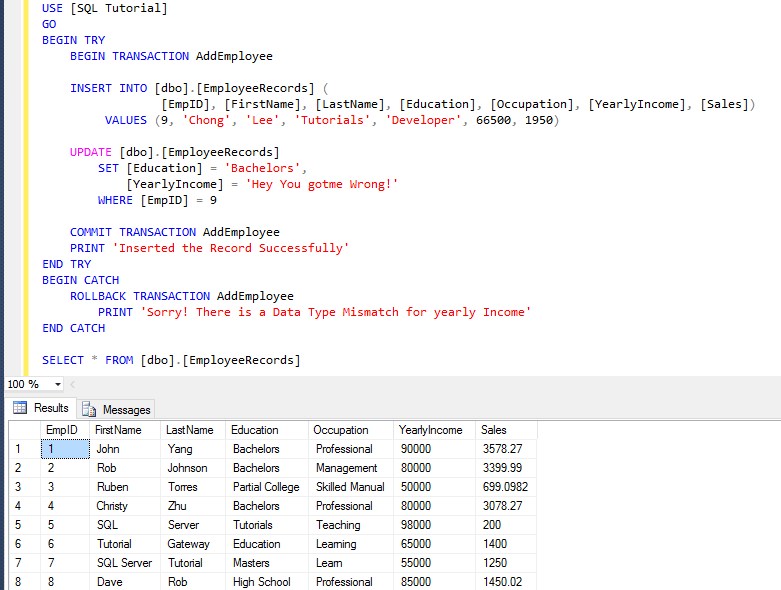
BEGIN TRY

    BEGIN TRANSACTION;

    UPDATE Accounts
    SET Balance = Balance - 500
    WHERE Id = 1;

    UPDATE Accounts
    SET Balance = Balance + 500
    WHERE Id = 2;

    COMMIT;

END TRY
BEGIN CATCH

    ROLLBACK;

END CATCH
Used in real projects.
10. Where Transactions are Used in Real Projects
- Banking software
- E-commerce order system
- Payment gateway
- Login / Registration
- Inventory system
- ERP / CRM software
- Financial software
Example:
- Order placed → Payment → Stock update → Invoice
- All must succeed or fail together.
11. Conclusion
SQL Transaction is one of the most important features of database.
It ensures:
- Data safety
- Data consistency
- Error handling
- Reliable system
Every developer working with SQL, .NET, Java, API, Banking, or ERP must understand transactions.
