0
Where can we go through for our awards and achievements at MindStick?

1 Answer
0
As the name insinuates, it is the section on your resume where you list appropriate honors, recognition, achievements, or awards you received for proceeding beyond ordinary.
It includes financial projects, work-related awards, or even promotions to leadership for your company.
To go to the awards and achievements section:
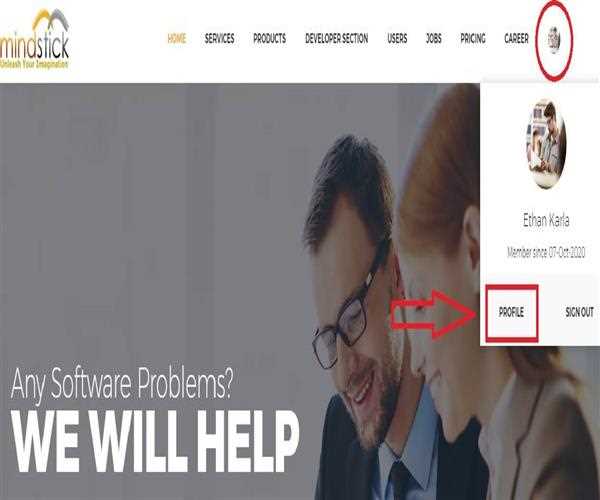
- Go to the official MindStick page by clicking www.mindstick.com. Now as you reach the Home page bring your cursor to your profile picture present in the top right corner where a pop up screen will appear.
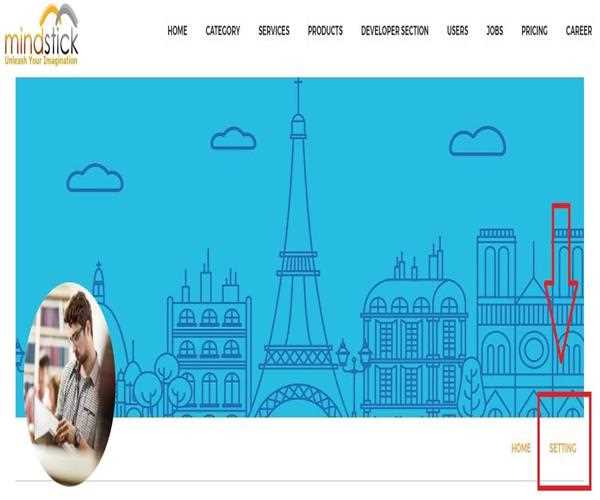
- Now as you reach your profile you need to click on the "Setting" option which is again present in the top right corner of your profile page just below your banner image.
- Now you will find the "Awards" button on the bottom left menu.
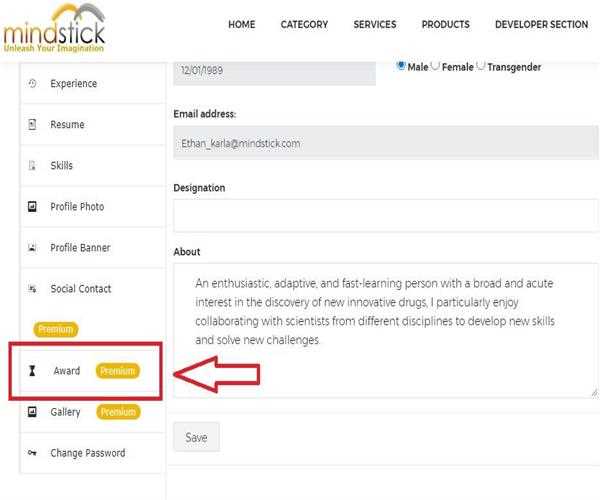
- So, Award section comes under the premium membership category for which you have to pay a nominal charge to access and add your achievements and recognitions.