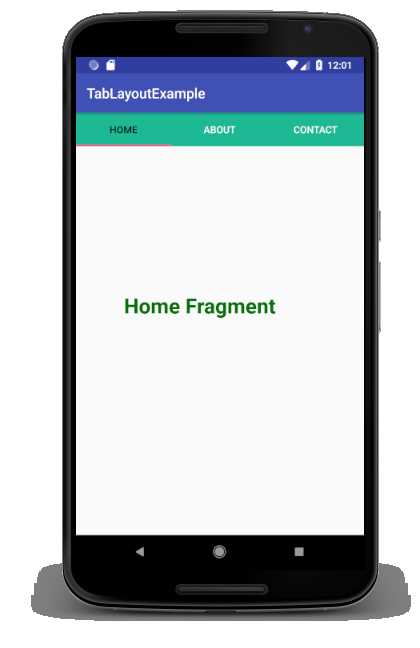
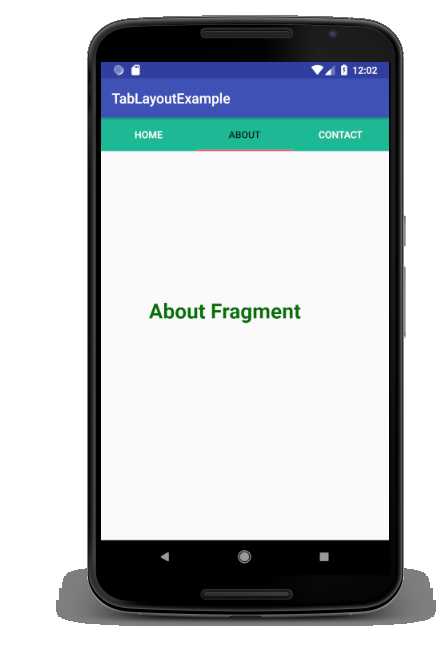
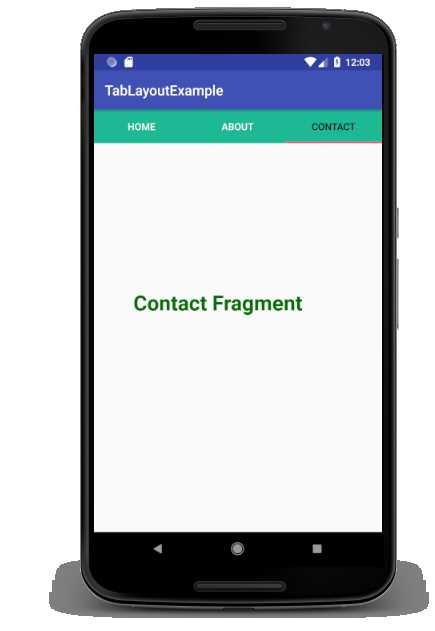
1
What is ViewPager?

What is ViewPager?
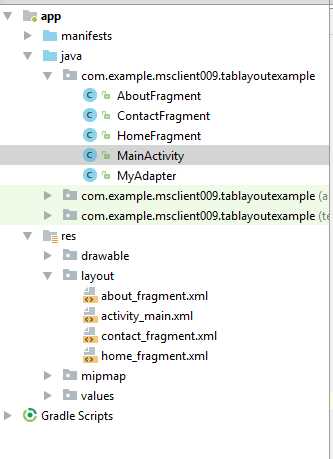
<?xml version="1.0" encoding="utf-8"?>
<android.support.constraint.ConstraintLayout xmlns:android="http://schemas.android.com/apk/res/android"
    xmlns:app="http://schemas.android.com/apk/res-auto"
    xmlns:tools="http://schemas.android.com/tools"
    android:layout_width="match_parent"
    android:layout_height="match_parent"
    tools:context="com.example.msclient009.tablayoutexample.MainActivity">
    <android.support.design.widget.TabLayout
        android:id="@+id/tabLayout"
        android:layout_width="match_parent"
        android:layout_height="wrap_content"
        app:tabTextColor="#fff"
        android:background="#1db995">
    </android.support.design.widget.TabLayout>
    <android.support.v4.view.ViewPager
        android:id="@+id/viewPager"
        android:layout_width="355dp"
        android:layout_height="455dp"
        app:layout_constraintTop_toBottomOf="@+id/tabLayout"
        tools:layout_editor_absoluteY="8dp">
    </android.support.v4.view.ViewPager>
</android.support.constraint.ConstraintLayout>
package com.example.msclient009.tablayoutexample;
import android.support.design.widget.TabLayout;
import android.support.v4.view.ViewPager;
import android.support.v7.app.AppCompatActivity;
import android.os.Bundle;
public class MainActivity extends AppCompatActivity {
 TabLayout tabLayout;
 ViewPager viewPager;
    @Override
    protected void onCreate(Bundle savedInstanceState) {
        super.onCreate(savedInstanceState);
        setContentView(R.layout.activity_main);
        tabLayout=(TabLayout)findViewById(R.id.tabLayout);
        viewPager=(ViewPager)findViewById(R.id.viewPager);
        tabLayout.addTab(tabLayout.newTab().setText("Home"));
        tabLayout.addTab(tabLayout.newTab().setText("About"));
        tabLayout.addTab(tabLayout.newTab().setText("Contact"));
        tabLayout.setTabGravity(TabLayout.GRAVITY_FILL);
        final MyAdapter adapter = new MyAdapter(this,getSupportFragmentManager(), tabLayout.getTabCount());
        viewPager.setAdapter(adapter);
        viewPager.addOnPageChangeListener(new TabLayout.TabLayoutOnPageChangeListener(tabLayout));
        tabLayout.addOnTabSelectedListener(new TabLayout.OnTabSelectedListener() {
            @Override
            public void onTabSelected(TabLayout.Tab tab) {
                viewPager.setCurrentItem(tab.getPosition());
            }
            @Override
            public void onTabUnselected(TabLayout.Tab tab) {
            }
            @Override
            public void onTabReselected(TabLayout.Tab tab) {
            }
        });
    }
}
package com.example.msclient009.tablayoutexample;
import android.content.Context;
import android.support.v4.app.Fragment;
import android.support.v4.app.FragmentPagerAdapter;
import android.support.v4.app.FragmentManager;
public class MyAdapter extends FragmentPagerAdapter {
    private Context myContext;
    int totalTabs;
    public MyAdapter(Context context, FragmentManager fm, int totalTabs) {
        super(fm);
        myContext = context;
        this.totalTabs = totalTabs;
    }
    // this is for fragment tabs
    @Override
    public Fragment getItem(int position) {
        switch (position) {
            case 0:
                HomeFragment homeFragment = new HomeFragment();
                return homeFragment;
            case 1:
                AboutFragment aboutFragment = new AboutFragment();
                return aboutFragment;
            case 2:
                ContactFragment contactFragment = new ContactFragment();
                return contactFragment;
                default:
                    return null;
        }
    }
   // this counts total number of tabs
    @Override
    public int getCount() {
        return totalTabs;
    }
}
<?xml version="1.0" encoding="utf-8"?>
<FrameLayout
    xmlns:android="http://schemas.android.com/apk/res/android"
    android:layout_width="match_parent"
    android:id="@+id/homeFragment"
    android:layout_height="match_parent">
    <TextView
        android:layout_width="match_parent"
        android:layout_height="match_parent"
        android:gravity="center"
        android:textColor="#037103"
        android:textSize="30dp"
        android:textStyle="bold"
        android:text="@string/home_fragment" />
</FrameLayout>
package com.example.msclient009.tablayoutexample;
import android.os.Bundle;
import android.support.v4.app.Fragment;
import android.view.LayoutInflater;
import android.view.View;
import android.view.ViewGroup;
public class HomeFragment extends Fragment {
    public HomeFragment() {
    }
    @Override
    public View onCreateView(LayoutInflater inflater, ViewGroup container, Bundle savedInstanceState) {
        // Inflate the layout for this fragment
        View mView = inflater.inflate(R.layout.home_fragment,container, false);
        return mView;
    }
}
<?xml version="1.0" encoding="utf-8"?>
<FrameLayout
xmlns:android="http://schemas.android.com/apk/res/android"
android:layout_width="match_parent"
android:id="@+id/aboutFragment"
android:layout_height="match_parent">
<TextView
    android:layout_width="match_parent"
    android:layout_height="match_parent"
    android:gravity="center"
    android:textColor="#037103"
    android:textSize="30dp"
    android:textStyle="bold"
    android:text="@string/about_fragment"/>
</FrameLayout>
package com.example.msclient009.tablayoutexample;
        import android.os.Bundle;
        import android.support.v4.app.Fragment;
        import android.view.LayoutInflater;
        import android.view.View;
        import android.view.ViewGroup;
public class AboutFragment extends Fragment {
    public AboutFragment() {
    }
    @Override
    public View onCreateView(LayoutInflater inflater, ViewGroup container, Bundle savedInstanceState) {
        // Inflate the layout for this fragment
        View mView = inflater.inflate(R.layout.about_fragment,container, false);
        return mView;
    }
}
<?xml version="1.0" encoding="utf-8"?>
<FrameLayout
xmlns:android="http://schemas.android.com/apk/res/android"
android:layout_width="match_parent"
android:id="@+id/contactFragment"
android:layout_height="match_parent">
<TextView
    android:layout_width="match_parent"
    android:layout_height="match_parent"
    android:gravity="center"
    android:textColor="#037103"
    android:textSize="30dp"
    android:textStyle="bold"
    android:text="@string/contact_fragment"/>
</FrameLayout>
package com.example.msclient009.tablayoutexample;
import android.os.Bundle;
import android.support.v4.app.Fragment;
import android.view.LayoutInflater;
import android.view.View;
import android.view.ViewGroup;
public class ContactFragment extends Fragment {
    public ContactFragment() {
    }
    @Override
    public View onCreateView(LayoutInflater inflater, ViewGroup container, Bundle savedInstanceState) {
        // Inflate the layout for this fragment
        View mView = inflater.inflate(R.layout.contact_fragment,container, false);
        return mView;
    }
}
<resources>
    <string name="app_name">TabLayoutExample</string>
    <string name="home_fragment">Home Fragment</string>
    <string name="about_fragment">About Fragment</string>
    <string name="contact_fragment">Contact Fragment</string>
</resources>