How to send data from one fragment to another fragment in same activity
1 Answer
1
Two fragment in one activity
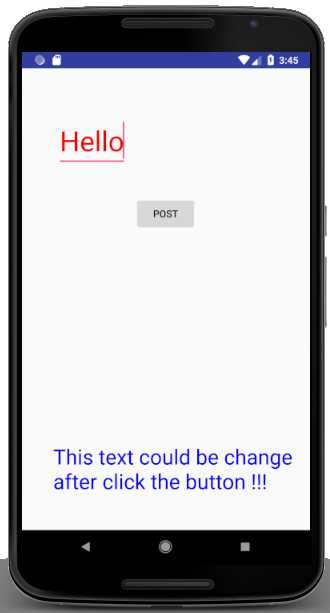
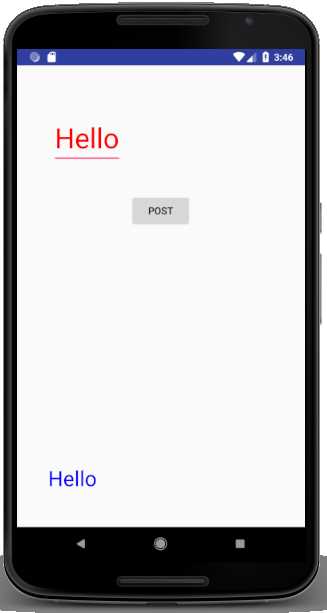
A fragment is a part of activity & it also represents a portion of user interface in an activity, and provides a powerful mechanism to ads UI Components, after being created this modules can be embedded within activity. The fragment's lifecycle is directly affected by the activity's lifecycle. For example, when the activity is paused/stop, so all fragment is also pause/stop, and when the activity is destroyed, so all fragment is also destroy.
When you add a fragment as a part of your activity layout, it behave as a ViewGroup inside the activity's view lifecycle and the fragment defines its own view layout. You can add many fragment into your activity file by declaring the fragment in the activity's layout file, within <fragment> element
Functionality of two Fragment:
The Functionality of first fragment is, it contain EditText and Button object. And the second fragment will contain only TextView object. Finally, two fragment will be embedded within the main_activity.xml file and when the button of first fragment is pressed, the text entered into the EditText of frist fragment will appear on the TextView of the second fragment.
Creating a First Fragment Layout File:
Right-click on the layout package under res and selecting the New ?Layout Resource File ? give the name first_fragment.xml ? select RelativeLayout and click Finish.After that modify the xml fragment file-
first_fragment.xml
<?xml version="1.0" encoding="utf-8"?>

<RelativeLayout

    xmlns:android="http://schemas.android.com/apk/res/android"

    android:layout_width="match_parent"

    android:layout_height="match_parent">


    <EditText

        android:id="@+id/editText1"

        android:layout_width="wrap_content"

        android:layout_height="wrap_content"

        android:layout_alignParentTop="true"

        android:layout_marginEnd="11dp"

        android:layout_marginRight="11dp"

        android:layout_marginTop="35dp"

        android:layout_toLeftOf="@+id/button1"

        android:layout_toStartOf="@+id/button1"

        android:textColor="#f00"

        android:textSize="40dp">


        <requestFocus />

    </EditText>


    <Button

        android:id="@+id/button1"

        android:text="Post"

        android:layout_width="wrap_content"

        android:layout_height="wrap_content"

        android:layout_below="@+id/editText1"

        android:layout_centerHorizontal="true"

        android:layout_marginTop="43dp" />


</RelativeLayout>
FirstFragment.java
package com.example.msclient009.fragmentinactivity;


import android.app.Activity;

import android.app.Fragment;

import android.os.Bundle;

import android.view.LayoutInflater;

import android.view.View;

import android.view.ViewGroup;

import android.widget.Button;

import android.widget.EditText;


public class FirstFragment extends android.app.Fragment {


    private static EditText mEditText;

    FirstFragmentListener activityCallback;

    //Listener for onButtonClick UI

    public interface FirstFragmentListener {

        public void onButtonClick(String text);

    }


    @Override

    public void onAttach(Activity activity) {

        super.onAttach(activity);

        try {

            activityCallback = (FirstFragmentListener) activity;

        } catch (ClassCastException e) {

            throw new ClassCastException(activity.toString() + " must implement FirstFragmentListener");

        }

    }


    //We get the reference to the editText and the button setUp the OnClickListener

    @Override

    public View onCreateView(LayoutInflater inflater, ViewGroup container, Bundle savedInstanceState) {

// Inflate the layout for this fragment

        View view = inflater.inflate(R.layout.first_fragment, container, false);

        mEditText = (EditText) view.findViewById(R.id.editText1);

        final Button button = (Button) view.findViewById(R.id.button1);

        button.setOnClickListener(new View.OnClickListener() {

            public void onClick(View v) {

                buttonClicked(v);

            }

        });

        return view;

    }


    //Set the activityCallback to onButtonClick passing the text in the mEditText

    public void buttonClicked(View view) {

        activityCallback.onButtonClick(mEditText.getText().toString());

    }

}
Creating the Second Fragment Layout File
Add a new Android XML Layout file to your project, once again selecting the options to create a layout resource file with a RelativeLayout as the root element. Name the file second_fragment.xml and click Finish. After that modify the XML file are as follows-
second_fragment.xml
<?xml version="1.0" encoding="utf-8"?>

<RelativeLayout

    xmlns:android="http://schemas.android.com/apk/res/android" android:layout_width="match_parent"

    android:layout_height="match_parent">


    <TextView

        android:id="@+id/textView1"

        android:layout_width="wrap_content"

        android:layout_height="wrap_content"

        android:layout_alignParentLeft="true"

        android:layout_alignParentStart="true"

        android:layout_alignParentTop="true"

        android:layout_marginLeft="45dp"

        android:layout_marginStart="45dp"

        android:layout_marginTop="116dp"

        android:text="This text could be change after click the button !!!"

        android:textColor='#00f'

        android:textSize="30dp" />


</RelativeLayout>
SecondFragment.java
package com.example.msclient009.fragmentinactivity;


import android.os.Bundle;

import android.view.LayoutInflater;

import android.view.View;

import android.view.ViewGroup;

import android.widget.TextView;


public class SecondFragment extends android.app.Fragment {

    private static TextView mTextView;

    @Override

    public View onCreateView(LayoutInflater inflater, ViewGroup container, Bundle savedInstanceState) {

        View view = inflater.inflate(R.layout.second_fragment, container, false);

        mTextView = (TextView) view.findViewById(R.id.textView1);

        return view;

    }

    public void changeTextProperties(String text) {

        mTextView.setText(text);

    }


}
Adding the Fragments to the Activity
First we need to add both fragments to the main_activity.xml layout file, open the main_activity.xml and embed the two fragments as follows:
main_activity.xml
<?xml version="1.0" encoding="utf-8"?>

<RelativeLayout xmlns:android="http://schemas.android.com/apk/res/android"

    xmlns:app="http://schemas.android.com/apk/res-auto"

    xmlns:tools="http://schemas.android.com/tools"

    android:layout_width="match_parent"

    android:layout_height="match_parent"

    tools:context="com.example.msclient009.fragmentinactivity.MainActivity">


    <fragment

        android:id="@+id/first_fragment"

        android:layout_width="match_parent"

        android:layout_height="wrap_content"

        android:layout_alignParentLeft="true"

        android:layout_alignParentStart="true"

        android:layout_alignParentTop="true"

        android:layout_marginTop="31dp"

        android:background="#0f0"

        tools:layout="@layout/first_fragment"

        class = "com.example.msclient009.fragmentinactivity.FirstFragment"/>


    <fragment

        android:id="@+id/second_fragment"

        class="com.example.msclient009.fragmentinactivity.SecondFragment"

        android:layout_width="match_parent"

        android:layout_height="wrap_content"

        android:layout_alignParentBottom="true"

        android:background="#0f0"

        android:layout_alignParentLeft="true"

        android:layout_alignParentStart="true"

        android:layout_marginBottom="50dp"

        tools:layout="@layout/second_fragment" />


</RelativeLayout>
MainActivity.java
package com.example.msclient009.fragmentinactivity;


import android.os.Bundle;

import android.support.v4.app.FragmentActivity;


public class MainActivity extends FragmentActivity implements FirstFragment.FirstFragmentListener {

    @Override

    protected void onCreate(Bundle savedInstanceState) {

        super.onCreate(savedInstanceState);

        setContentView(R.layout.activity_main);

    }

    @Override

    public void onButtonClick(String text) {

        SecondFragment textFragment = (SecondFragment) getFragmentManager().findFragmentById(R.id.second_fragment);

        textFragment.changeTextProperties(text);

    }

}
Output :
After Clicking on the Button
